# Options d'impression et PDF

#### **1.OPTION DE MASQUAGE**

[![OptSoustotal.png](https://wiki.infras.fr/uploads/images/gallery/2026-03/scaled-1680-/CgNQq5iOpENIkQU0-optsoustotal.png)](https://wiki.infras.fr/uploads/images/gallery/2026-03/scaled-1680-/CgNQq5iOpENIkQU0-optsoustotal.png)
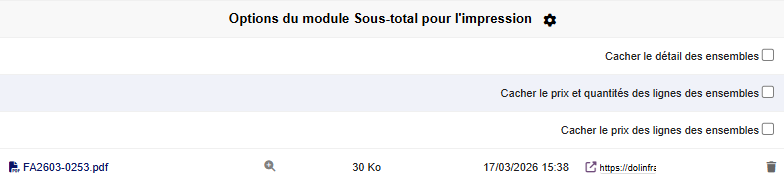
Avant de générer un PDF, vous pouvez configurer différentes options de masquage :

- - - **Cacher le prix des lignes des ensembles \[Ligne 1\] :** <span style="white-space: pre-wrap;">Paramètre : </span>`<span class="editor-theme-code">SUBTOTAL_HIDE_PRICE_DEFAULT_CHECKED</span>`
        - **Masquer les totaux du document \[Ligne 2\] :** <span style="white-space: pre-wrap;">Paramètre : </span>`<span class="editor-theme-code">SUBTOTAL_HIDE_DOCUMENT_TOTAL</span>`
        - **Afficher la quantité sur les lignes de produit \[Ligne 3\] :** <span style="white-space: pre-wrap;">Paramètre : </span>`<span class="editor-theme-code">SUBTOTAL_IF_HIDE_PRICES_SHOW_QTY</span>`

#### **2.NUMÉROTATION AUTOMATIQUE**

<span style="white-space: pre-wrap;">Avec </span>`<span class="editor-theme-code">SUBTOTAL_USE_NUMEROTATION</span>`<span style="white-space: pre-wrap;"> activé, les titres sont automatiquement numérotés dans le PDF :</span>

**1. Premier titre**

- - - - 1.1 Sous-titre
            - 1.2 Autre sous-titre

**2. Deuxième titre**

- - - - 2.1 Sous-titre

#### **3. RÉCAPITULATIFS**

[![optST2.png](https://wiki.infras.fr/uploads/images/gallery/2026-03/scaled-1680-/mRsJfx23MiT9K0X1-optst2.png)](https://wiki.infras.fr/uploads/images/gallery/2026-03/scaled-1680-/mRsJfx23MiT9K0X1-optst2.png)

**Génération d'un PDF récapitulatif par titre**

<table id="bkmrk-documentparam%C3%A8trepro" style="width: 100%; border-collapse: collapse; font-size: 14px;"><colgroup><col></col><col></col></colgroup><tbody><tr style="height: 10px; background: rgb(102, 122, 129); color: white; border-bottom: 2px solid rgb(102, 122, 129);"><th class="align-left" style="text-align: left; padding: 12px; font-weight: 600;">Document

</th><th class="align-left" style="text-align: left; padding: 12px; font-weight: 600;">Paramètre

</th></tr><tr style="border-bottom: 1px solid rgb(233, 236, 239);"><td style="padding: 12px;">Propositions commerciales

</td><td style="padding: 12px; font-family: "Courier New", monospace; color: rgb(61, 73, 77); font-size: 12px;">SUBTOTAL\_PROPAL\_ADD\_RECAP

</td></tr><tr style="border-bottom: 1px solid rgb(233, 236, 239);"><td style="padding: 12px;">Commandes

</td><td style="padding: 12px; font-family: "Courier New", monospace; color: rgb(61, 73, 77); font-size: 12px;">SUBTOTAL\_COMMANDE\_ADD\_RECAP

</td></tr><tr style="border-bottom: 1px solid rgb(233, 236, 239);"><td style="padding: 12px;">Factures

</td><td style="padding: 12px; font-family: "Courier New", monospace; color: rgb(61, 73, 77); font-size: 12px;">SUBTOTAL\_INVOICE\_ADD\_RECAP

</td></tr><tr><td style="padding: 12px;">Conserver le PDF après fusion

</td><td style="padding: 12px; font-family: "Courier New", monospace; color: rgb(61, 73, 77); font-size: 12px;">SUBTOTAL\_KEEP\_RECAP\_FILE

</td></tr></tbody></table>

Le récapitulatif génère un document séparé pour chaque titre, puis fusionne le tout avec le document principal.

#### **4. AFFICHAGE DE LA TVA**

[![tvaopt.png](https://wiki.infras.fr/uploads/images/gallery/2026-03/scaled-1680-/OGbx5V1VTfE55m9R-tvaopt.png)](https://wiki.infras.fr/uploads/images/gallery/2026-03/scaled-1680-/OGbx5V1VTfE55m9R-tvaopt.png)

**SUBTOTAL\_SHOW\_TVA\_ON\_SUBTOTAL\_LINES\_ON\_ELEMENTS :** Affiche le taux de TVA sur les sous-totaux si toutes les lignes du bloc ont le même taux.

**SUBTOTAL\_LIMIT\_TVA\_ON\_CONDENSED\_BLOCS** : Limite l'affichage de la TVA aux blocs en mode condensé ou liste

#### **5. COULEURS ET DÉGRADÉE**

[![brightness.png](https://wiki.infras.fr/uploads/images/gallery/2026-03/scaled-1680-/pNrWCeKhIFbDQ489-brightness.png)](https://wiki.infras.fr/uploads/images/gallery/2026-03/scaled-1680-/pNrWCeKhIFbDQ489-brightness.png)

Les couleurs de fond s'adaptent automatiquement selon le niveau hiérarchique :

- - Niveau 1 - Couleur définie
    - Niveau 2 - Couleur éclaircie
    - Niveau 3 - Encore plus claire

**Paramètre :**<span style="white-space: pre-wrap;"> </span>`<span class="editor-theme-code">SUBTOTAL_TITLE_AND_SUBTOTAL_BRIGHTNESS_PERCENTAGE</span>`

#### **6. SOMMAIRE RAPIDE**

[![somaire.png](https://wiki.infras.fr/uploads/images/gallery/2026-03/scaled-1680-/uFT67dzfhq0PdTsP-somaire.png)](https://wiki.infras.fr/uploads/images/gallery/2026-03/scaled-1680-/uFT67dzfhq0PdTsP-somaire.png)

Un menu "Sommaire rapide" apparaît automatiquement dans le menu de gauche lorsque le document contient des titres. Il permet de naviguer rapidement entre les sections.

**Désactivation :**<span style="white-space: pre-wrap;"> </span>`<span class="editor-theme-code">SUBTOTAL_DISABLE_SUMMARY</span>`
