# InfraSPackPlus
Module d'édition de pack avancée
# 01. PRÉSENTATION GÉNÉRALE
# Présentation du module
[](https://wiki.infras.fr/uploads/images/gallery/2026-02/scaled-1680-/MmBm7ItQhkF38ra8-infrasspackplus.png)
***InfraSPackPlus*** est un module optionnel pour ***Dolibarr*** ERP & CRM qui enrichit considérablement les modèles de documents PDF de base. Ce module transforme vos documents commerciaux en véritables outils de communication professionnelle hautement personnalisables.
#### **PRINCIPALES FONCTIONNALITÉS**
- **Plus de 37 modèles** pour 20 types de documents différents
- **Plus de 709 options** de personnalisation (dont 32 modifiables directement sur la fiche)
- **Gestion avancée** des couleurs, images, filigranes et styles
- **Support des adresses multiples** pour la société et les tiers
- **Gestion complète des images** (logo, pied de page, images produits)
- **Intégration CGV/CGI/CGA** avec pagination automatique
- **Attributs supplémentaires** sur documents et lignes
- **Affichage 'full' TTC** et total en toutes lettres
- **Signatures électroniques** et zones de signature
- **Codes QR** (paiement, ZATCA, EPC, Suisse)
#### **TYPES DE DOCUMENTS SUPPORTÉS**
***Chaîne des ventes***
- Devis (avec et sans total)
- Commandes client
- Contrats
- Factures
- Bons de livraison / Expéditions
- Fiches d'intervention
***Chaîne des achats***
- Devis fournisseur
- Commandes fournisseur
- Factures fournisseur
- Bons de réception
***Documents techniques***
- Fiches produit / services
- Étiquettes avec code-barre
- Fiches de stock
- Ordres de fabrication
- Nomenclatures
***Documents administratifs***
- Notes de frais
- Cartes utilisateurs
- Projets
#### **COMPATIBILITÉ**
***Modules compatibles :***
- Sous-Total (ATM Consulting - version améliorée InfraS)
- Milestone/Jalon (iNodbox)
- Ouvrage/Forfait (Inovea)
- Équipement (Patas-Monkey)
- CustomLink (Patas-Monkey)
- Note de Frais Plus (Mikael Carlavan)
- Attestation de TVA (Iouston)
- Infras2Bridge (InfraS)
***Prérequis :***
- Nécessite le module ECM de ***Dolibarr***
- Module optionnel : Number Words (pour total en toutes lettres)
© 2016-2026 InfraS - Sylvain Legrand | support@infras.fr | https://www.infras.fr
# 02. INSTALLATION ET ACTIVATION
# Installation et Activation
#### **1.MÉTHODE RECOMMANDÉE**
1. Utilisez de préférence l'outil de déploiement des modules externes de ***Dolibarr***
2. Accédez à **Configuration → Modules/Applications → Déployer/Installer module externe**
3. Téléversez le fichier ZIP du module
4. Suivez les instructions à l'écran
#### **2.INSTALLATION MANUELLE**
Si vous préférez l'installation manuelle :
1. Décompressez l'archive du module
2. Placez le répertoire `infraspackplus` dans : **htdocs/custom/infraspackplus/**
3. Assurez-vous que les permissions soient correctes (lecture pour le serveur web)
#### **3.ACTIVATION DU MODULE**
| **Étape**
| **Action**
|
|---|
| **1**
| Accédez à **Configuration → Modules/Applications**
|
| **2**
| Recherchez "***InfraSPackPlus***" dans la liste des modules
|
| **3**
| Cliquez sur le bouton **"Activer"**
|
| **4**
| Attendez la fin du processus d'activation
|
**Il est IMPÉRATIF de désactiver puis réactiver le module** pour appliquer les modifications nécessaires.
***Procédure de réactivation :***
1. Configuration → Modules/Applications
2. Localisez ***InfraSPackPlus***
3. Cliquez sur **"Désactiver"**
4. Attendez la confirmation
5. Cliquez sur **"Activer"**
***Cette opération permet de:***
***Fichiers***
- Copier des nouvelles polices de caractères
- Créer des répertoires nécessaires
- Synchroniser des fichiers système
***Base de données***
- Mettre à jour des tables
- Migrer des données, si nécessaire
- Créer des dictionnaires
***Paramètres***
- Restaurer automatiquement des paramètres sauvegardés
- Appliquer des configurations
- Initialiser des constantes
***Sécurité***
- Vérifier des permissions
- Valider l'intégrité de la base de données
- Sauvegarder automatiquement les paramètres du module
#### **4.VÉRIFICATION DE L'INSTALLATION**
**Pour vérifier que le module est correctement installé :**
1. Accédez au menu **Outils**
2. Vérifiez la présence du sous-menu **InfraS**
3. Cliquez sur **InfraS → InfraSPackPlus**
4. Vous devriez voir le menu de configuration du module
####
###
# 03. CONFIGURATION GÉNÉRALE
# Configuration Générale
Après activation, le module ajoute un menu dans : **Outils → InfraS → InfraSPackPlus**
#### **1.PERMISSIONS DISPONIBLES**
Le module propose différents niveaux de droits pour les utilisateurs non-administrateurs :
| **Permission**
| **Par défaut**
| **Description**
|
|---|
| **Accès au menu InfraS**
| **OUI**
| Afficher le menu dans l'interface
|
| **Paramètres PDF Dolibarr**
| **NON**
| Modifier les paramètres généraux PDF
|
| **Paramètres spécifiques InfraS**
| **NON**
| Configurer les options InfraS
|
| **Gestion des images**
| **NON**
| Télécharger/gérer logos et images
|
| **Gestion des adresses**
| **NON**
| Créer/modifier les adresses multiples
|
| **Attributs supplémentaires**
| **NON**
| Configurer les attributs sur documents
|
| **Mentions complémentaires**
| **NON**
| Créer/modifier les mentions
|
| **Notes publiques**
| **NON**
| Créer/modifier les notes publiques
|
| **Dictionnaires**
| **NON**
| Accéder aux dictionnaires du module
|
| **Génération de documents**
| **NON**
| Paramètres de génération
|
| **Sauvegarde/Restauration**
| **NON**
| Sauvegarder/restaurer les paramètres
|
| **Options avant génération**
| **OUI**
| Accéder aux options sur la fiche
|
| **CGV/CGA/CGI**
| **OUI**
| Choisir les CGV avant génération
|
#### **2.CONFIGURATION DES DROITS**
**Pour configurer les permissions :**
1. Accédez à **Configuration → Utilisateurs & Groupes**
2. Sélectionnez un utilisateur
3. Cliquez sur l'onglet **"Permissions"**
4. Localisez la section **"*****InfraSPackPlus*****"**
5. Cochez les permissions souhaitées
6. Enregistrez les modifications
#### **3.SAUVEGARDE ET RESTAURATION DES PARAMÈTRES**
Le module offre un système complet de sauvegarde et de restauration pour protéger vos configurations.
***Sauvegarde Automatique***
**Lors de la désactivation du module :**
- - - - Tous les paramètres spécifiques sont automatiquement sauvegardés
- Une copie de sécurité est créée dans le répertoire d'administration
- Les fichiers sont horodatés pour une meilleure traçabilité
**Lors de la réactivation du module :**
- - - - Les paramètres sauvegardés sont automatiquement restaurés
- Aucune perte de configuration
- Traçabilité complète des opérations
***Sauvegarde Manuelle***
**Disponible dans chaque onglet de configuration :**
| **Action**
| **Description**
|
| Télécharger la sauvegarde
| Crée un fichier de sauvegarde téléchargeable sur votre ordinateur
|
| Restaurer
| Importe un fichier de sauvegarde précédent
|
#### **4.COPIE ENTRE ENTITÉS (Multi-Société)**
**Pour les installations multi-entités :**
1. **Sélectionnez l'entité cible**
Changez d'entité via le sélecteur en haut à droite
2. **Accédez à la configuration** ***InfraSPackPlus***
Menu **Outils → InfraS → InfraSPackPlus**
3. **Utilisez la fonction "Copier depuis une autre entité"**
Bouton disponible dans chaque onglet de configuration
4. **Sélectionnez l'entité source**
Choisissez l'entité dont vous voulez copier les paramètres
5. **Validez la copie**
Confirmez l'opération, les paramètres seront copiés
#### **5.BONNES PRATIQUES**
- **Sauvegardez régulièrement** vos paramètres, surtout avant des modifications importantes
- **Conservez plusieurs versions** de vos sauvegardes pour pouvoir revenir en arrière
- **Documentez vos configurations** pour faciliter la maintenance
- **Testez les restaurations** sur une entité de test avant d'utiliser l'entité de production
- **Nommez vos fichiers de sauvegarde** de manière explicite (date, entité, version)
# 04. PARAMÈTRES DOLIBARR (Onglet Général PDF)
# Paramètres Dolibarr
Cet onglet regroupe **42 options natives et améliorées** de ***Dolibarr*** pour personnaliser vos documents PDF.
[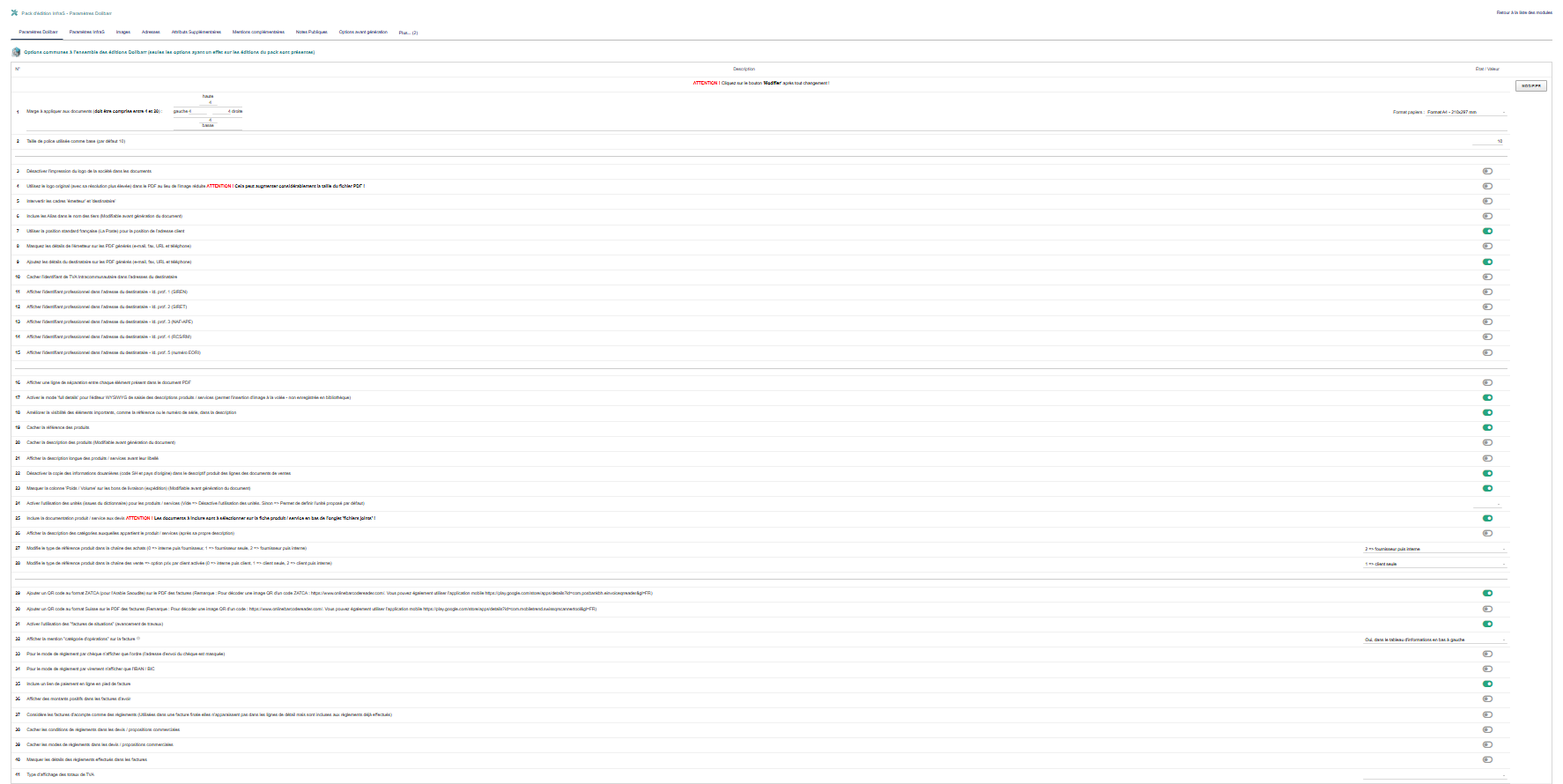](https://wiki.infras.fr/uploads/images/gallery/2026-02/scaled-1680-/idtLud6wWhSP4xdm-dolibarr.png)
#### **1.MISE EN PAGE ET FORMAT**
| **Option**
| **Description**
|
|---|
| **\[1\]**
| **Marges et format papier**
Définir les marges (haut, bas, gauche, droite) et le format (A4, Letter, etc.)
|
| **\[2\]**
| **Taille de police de base**
Taille de référence pour tous les textes du document
|
#### **2.LOGO ET IDENTITÉ**
| **Option**
| **Description**
|
|---|
| **\[3\]**
| **Désactiver l'impression du logo**
Ne pas afficher le logo de la société sur les documents
|
| **\[4\]**
| **Utiliser le logo haute résolution**
Utiliser l'original au lieu de la miniature
**⚠ ATTENTION : Augmente considérablement la taille du PDF !**
|
| **\[5\]**
| **Intervertir émetteur et destinataire**
Inverser la position des cadres d'adresse
|
#### **3.AFFICHAGE TIERS**
| **Option**
| **Description**
|
|---|
| **\[6\]**
| **Inclure les alias dans le nom des tiers**
Afficher le nom commercial alternatif avec la raison sociale
|
| **\[7\]**
| **Position standard française (La Poste)**
Positionner l'adresse client selon les normes postales françaises
|
| **\[14\]**
| **Utiliser le nom commercial (marque)**
Afficher la marque commerciale des tiers au lieu de la raison sociale
|
#### **4.DÉTAILS ÉMETTEUR/DESTINATAIRE**
| **Option**
| **Description**
|
|---|
| **\[8\]**
| **Masquer les détails de l'émetteur**
Cacher email, fax, URL et téléphone dans le cadre émetteur
|
| **\[9\]**
| **Ajouter les détails du destinataire**
Afficher email, fax, URL et téléphone du destinataire
|
| **\[10\]**
| **Cacher TVA Intracommunautaire**
Ne pas afficher le numéro de TVA du destinataire
|
***Identifiants professionnels du destinataire :***
- - [ ] **\[Ligne 11\]** Id. prof. 1 (SIREN)
- [ ] **\[Ligne 12\]** Id. prof. 2 (SIRET)
- [ ] **\[Ligne 13\]** Id. prof. 3 (NAF - APE)
- [ ] **\[Ligne 14\]** Id. prof. 4 (RCS/RM)
- [ ] **\[Ligne 15\]** Id. prof. 5 (EORI)
#### **5.PRÉSENTATION PRODUITS**
| **Option**
| **Description**
|
|---|
| **\[16\]**
| **Ligne de séparation entre éléments**
Afficher une ligne entre chaque ligne de produit
|
| **\[17\]**
| **Mode 'full details' éditeur WYSIWYG**
Permet l'insertion d'images à la volée dans les descriptions
|
| **\[18\]**
| **Améliorer la visibilité d'éléments importants**
Mettre en valeur référence et numéro de série
|
| **\[19\]**
| **Cacher la référence des produits**
Ne pas afficher les références dans les descriptions
|
| **\[20\]**
| **Cacher la description des produits**
Afficher uniquement le libellé court
|
| **\[21\]**
| **Inverser description et libellé**
Afficher la description avant le libellé (Dolibarr 10+)
|
| **\[22\]**
| **Désactiver la copie des infos douanières**
Ne pas copier Code SH et pays d'origine dans descriptif
|
| **\[23\]**
| **Masquer la colonne Poids/Volume**
Cacher cette colonne sur les bons de livraison
|
| **\[24\]**
| **Activer l'utilisation des unités**
Utiliser les unités du dictionnaire (kg, L, m², etc.)
|
| **\[25\]**
| **Inclure la documentation produit aux devis**
Fusionner les fichiers joints des produits avec le devis
|
| **\[26\]**
| **Afficher la description des catégories**
Ajouter la description des catégories du produit
|
#### **6.RÉFÉRENCES PRODUITS**
***\[27\]** *Type de référence - Chaîne des achats**
- - 0 = Référence interne, puis référence fournisseur
- **1** = Référence fournisseur seule
- **2** = Référence fournisseur, puis référence interne
***\[28\]** *Type de référence - Chaîne des ventes (prix par client)**
- - 0 = Référence interne, puis référence client
- **1** = Référence client seule
- **2** = Référence client, puis référence interne
#### **7.CODES QR ET FACTURES**
| **Option**
| **Description**
|
|---|
| **\[29\]**
| **Code QR ZATCA**
Imprimer un code QR ZATCA sur les factures (Arabie Saoudite)
|
| **\[30\]**
| **Code QR Suisse**
Imprimer un code QR Suisse sur les factures
|
| **\[31\]**
| **Activer factures de situations**
Gérer les factures d'avancement de travaux
|
| **\[32\]**
| **Catégorie d'opérations**
Afficher la "catégorie d'opérations" sur les factures
|
#### **8.MODES DE RÈGLEMENT**
| **Option**
| **Description**
|
|---|
| **\[33\]**
| **Chèque : ordre uniquement**
N'afficher que l'ordre, masquer l'adresse d'envoi
|
| **\[34\]**
| **Virement : IBAN/BIC uniquement**
N'afficher que l'IBAN et le code BIC
|
| **\[35\]**
| **Lien de paiement en ligne**
Inclure un lien de paiement en pied de facture
|
| **\[36\]**
| **Montants positifs dans avoirs**
Afficher des montants positifs dans les factures d'avoir
|
| **\[37\]**
| **Acomptes comme règlements**
Considérer les factures d'acompte comme des règlements
|
| **\[38\]**
| **Cacher les conditions de règlement (devis)**
Ne pas afficher les conditions dans les devis
|
| **\[39\]**
| **Cacher les modes de règlement (devis)**
Ne pas afficher les modes dans les devis
|
| **\[40\]**
| **Masquer les détails des règlements**
Ne pas afficher les règlements effectués dans les factures
|
#### **9.AFFICHAGE TVA**
***\[41\]** *Type d'affichage des totaux de TVA**
Choisir comment afficher les informations de TVA dans les totaux :
- **Taux seul** (ex: 20%)
- **Code seul** (ex: FR-20)
- **Description seule** (ex: TVA normale)
- **Taux et code** (ex: 20% FR-20)
- **Taux et description** (ex: 20% TVA normale)
- **Code et description** (ex: FR-20 TVA normale)
- **VIDE** = Afficher les trois (taux, code, description)
***\[42\]** *Configuration générale PDF**
Ouvrir la page de configuration générale des éditions PDF natives de ***Dolibarr*** pour accéder aux options standard.
# 05. PARAMÈTRES INFRAS (Onglet Spécifique)
# Chapitre 1 : Options de gestion du comportement des fonctions d'impression
[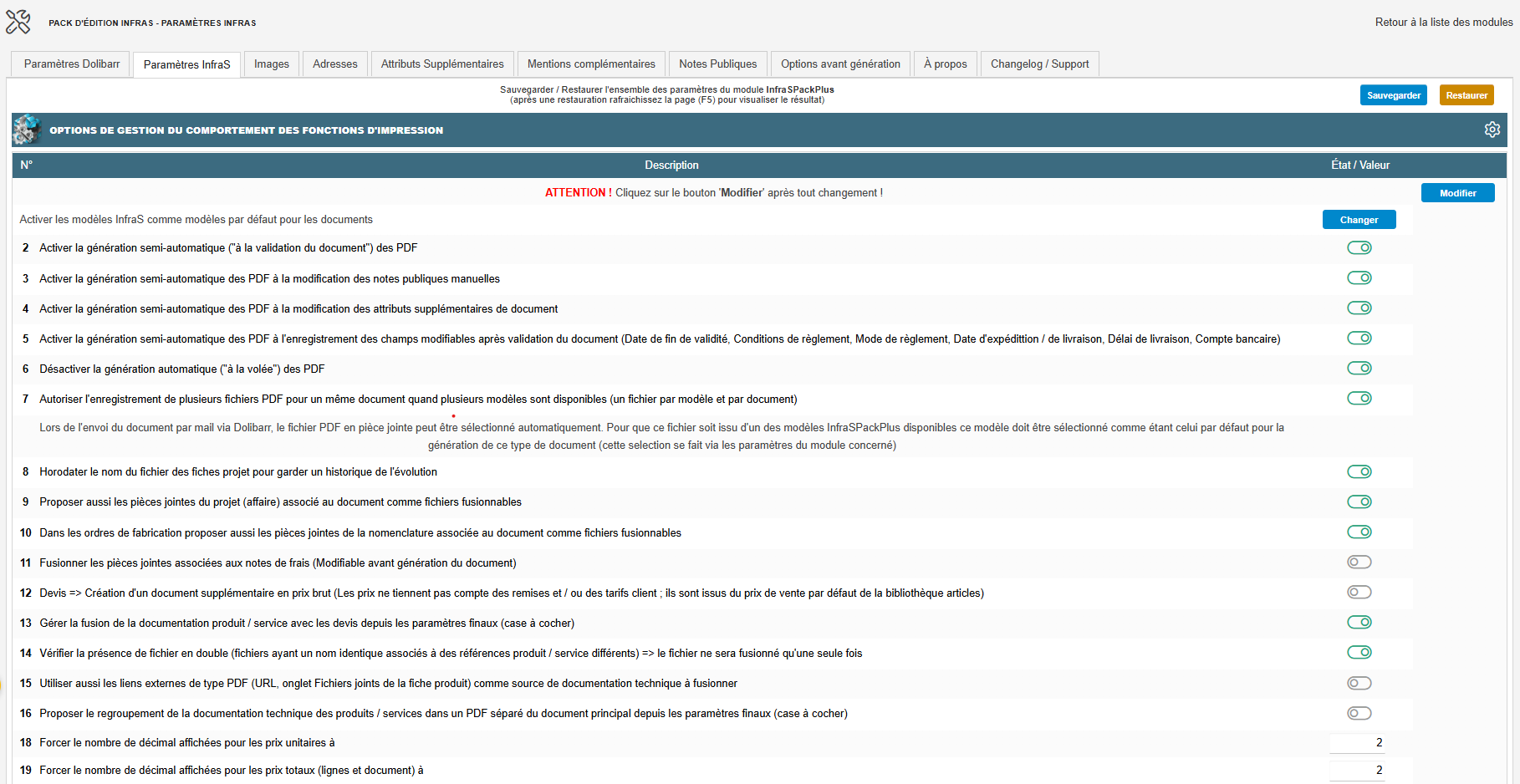](https://wiki.infras.fr/uploads/images/gallery/2026-07/scaled-1680-/0PFP563GckIp2YIL-v1.png)
- **Définir les modèles InfraS comme modèles par défaut pour tous les types de documents Dolibarr** (devis, commandes, factures, contrats, expéditions, réceptions, bons de livraison, notes de frais, BOM/MRP, tiers, projets, stock, utilisateurs, bordereaux de chèques...).
- **Activer la génération semi-automatique** : cela déclenche la régénération du PDF lors de la validation (ou de certaines modifications) du document, au lieu de générer le PDF à la volée de manière standard dans ***Dolibarr***.
- Régénérer le PDF lors de la modification des notes publiques manuelles.
- Régénérer le PDF lorsqu'il y a des changements dans les attributs supplémentaires du document.
- Régénérer le PDF lors de l'enregistrement des champs modifiables après validation (date de fin de validité, conditions de règlement, mode de règlement, date d'expédition/livraison, délai de livraison, compte bancaire).
- **Désactiver la génération automatique :** coupe le mécanisme standard de Dolibarr qui régénère automatiquement le PDF à chaque changement.
- **Permettre l'enregistrement de plusieurs fichiers PDF pour un même document lorsqu'il existe plusieurs modèles disponibles :** cela permet de conserver un fichier PDF distinct par modèle utilisé pour le même document, au lieu d'écraser un seul fichier à chaque génération.
- **Horodater le nom de fichier des fiches projet :** conserve un historique de l'évolution du document en ajoutant un horodatage au nom de fichier.
- Proposer également les pièces jointes du projet (affaire) associées comme fichiers fusionnables
- Dans les ordres de fabrication, offrir également les pièces jointes de la nomenclature associée comme fichiers fusionnables.
- Fusionner les pièces jointes des notes de frais (modifiable avant la génération du document).
- Pour les devis, créer un document supplémentaire affichant les prix bruts (prix basés sur le prix de vente par défaut, sans remise ni tarif client).
- Gérer la fusion de la documentation produit/service avec les devis à partir des paramètres finaux.
- Vérifier la présence de fichiers en double (même nom associé à des références produit différentes ; le fichier ne sera fusionné qu'une seule fois).
- Utiliser également les liens externes de type PDF (dans l'onglet Fichiers joints de la fiche produit) comme source de documentation technique à fusionner.
- Proposer le regroupement de la documentation technique dans un PDF séparé, via les paramètres finaux.
- Dans les devis, inclure également l'attestation de TVA associée comme fichier fusionnable.
- Forcer le nombre de décimales affichées pour les prix unitaires.
- Forcer le nombre de décimales affichées pour les prix totaux (lignes et document).
Cliquez sur "**Modifier**" après toute saisie n'impliquant pas un interrupteur.
# Chapitre 2 : Options de l'apparence générale des documents
[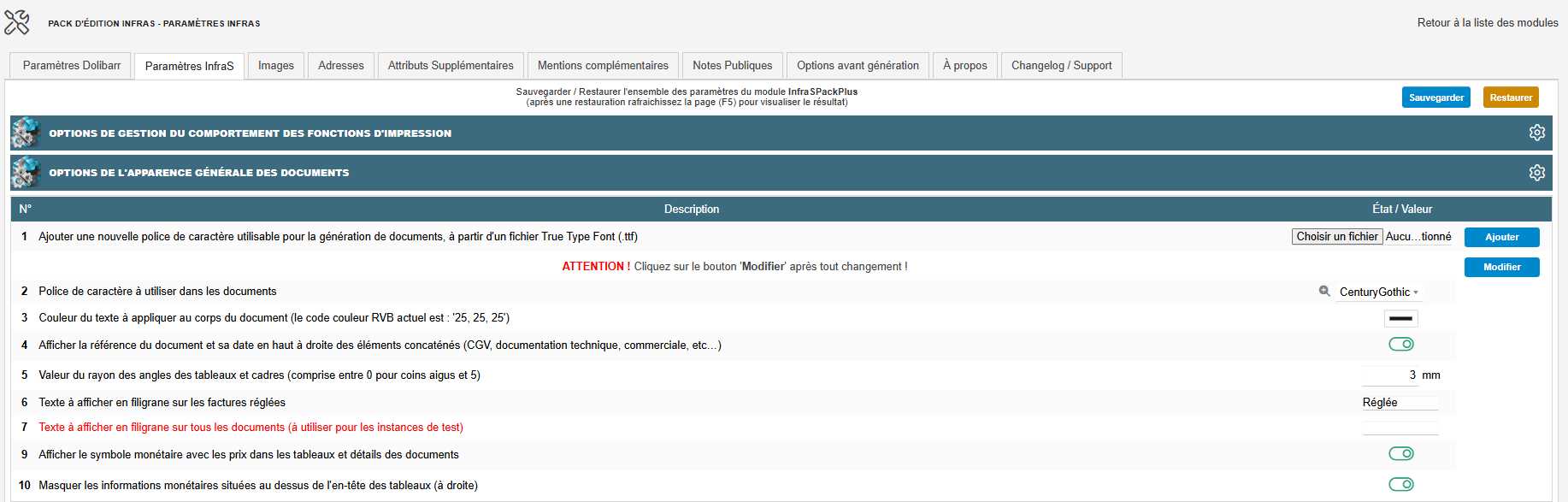](https://wiki.infras.fr/uploads/images/gallery/2026-07/scaled-1680-/FxWFDASMqychWLz4-v2.png)
- **Ajouter une nouvelle police de caractère :** permet de télécharger (uploader) une police TrueType personnalisée afin de l'ajouter à la liste des polices disponibles pour le module.
- **Police de caractère à utiliser dans les documents :** police par défaut utilisée pour le rendu des documents PDF ; un lien de prévisualisation permet d'ouvrir un PDF de test avec la police en cours.
- **Couleur du texte à appliquer au corps du document :** couleur RVB du texte du corps des documents PDF.
- Afficher la référence du document et sa date en haut à droite des éléments concaténés(CGV, documentation technique, commerciale, etc.)
- Valeur du rayon des angles des tableaux et cadres (0 = coins aigus, jusqu'à 5) : Champ numérique (0 à 5 mm, pas 0,001).
- Texte à afficher en filigrane sur les factures réglées
- Texte à afficher en filigrane sur tous les documents (à utiliser pour les instances de test)
- Texte à afficher en filigrane sur les devis provisoires (devis validés demandant un contrôle supplémentaire, ex. prévisite technique)
- Afficher le symbole monétaire avec les prix dans les tableaux et détails des documents. Conditionne laquelle des deux options suivantes est affichée :
- - - - Masquer les informations monétaires au-dessus de l'en-tête des tableaux
- Afficher le symbole monétaire dans le tableau des totaux
Cliquez sur "Modifier" après toute saisie non-interrupteur (police, couleur du texte, rayon d'arrondi, filigranes texte).
# Chapitre 3 : Options des en-têtes de document
[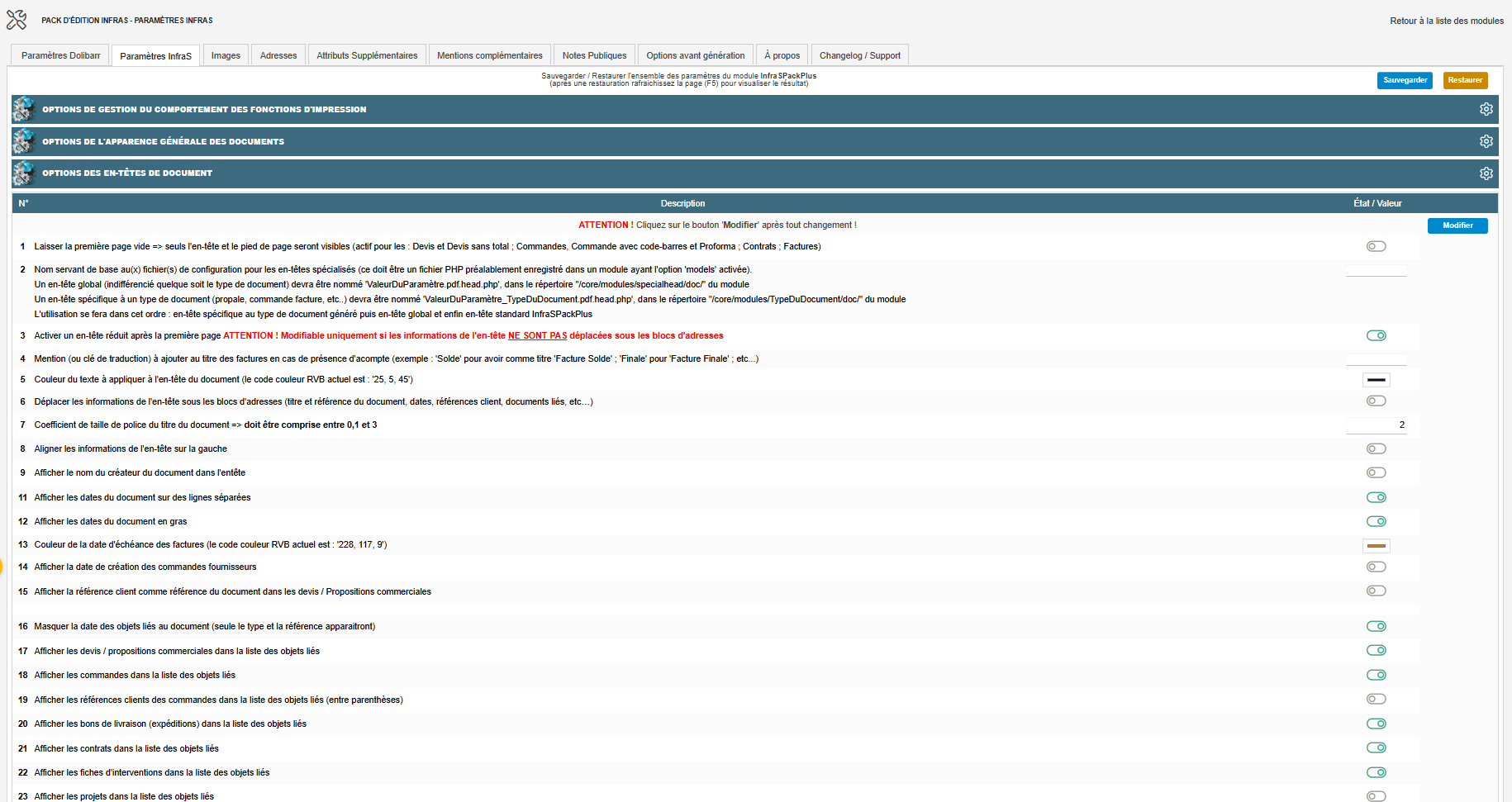](https://wiki.infras.fr/uploads/images/gallery/2026-07/scaled-1680-/gycDvOxJyQnkXsHy-v3.png)
- **Laisser la première page vide :** seuls l'en-tête et le pied de page restent visibles sur la première page (devis, commandes, contrats, factures). N'apparaît que dans un contexte particulier de page de garde.
- **Nom de base des fichiers de configuration pour les en-têtes spécialisés :** doit correspondre à un fichier PHP enregistré dans un module ayant l'option **« models »** activée. Ordre d'utilisation : en-tête spécifique au document, puis en-tête global, puis en-tête standard ***InfraSPackPlus***.
- **Activer un en-tête réduit après la première page :** bascule sur un en-tête condensé à partir de la 2e page. Force automatiquement à Oui si l'option *« Déplacer les informations de l'en-tête sous les adresses »* (ci-dessous) est activée.
- Mention à ajouter au titre des factures en cas d'acompte (ex. « Solde » donne « Facture Solde », « Finale » donne « Facture Finale »).
- Couleur du texte à appliquer à l'en-tête du document : titre, dates, références.
- **Déplacer les informations de l'en-tête sous les blocs d'adresses :** déplace titre/référence, dates, références client, documents liés, etc. sous les blocs d'adresses émetteur/destinataire. Force automatiquement l'en-tête réduit (ci-dessus) et désactive l'affichage du numéro client dans l'en-tête (voir plus bas). *Conditionne l'affichage des réglages suivants.*
- **Hauteur de l'espace supplémentaire entre le bloc d'adresses et les informations de l'en-tête (visible seulement si l'option ci-dessus est active) :** un minimum de 4 mm est déjà prévu par défaut.
- Coefficient de taille de police du titre du document, c'est-à-dire un coefficient multiplicateur de la taille de police du titre (***visible seulement si l'option « Déplacer... » ci-dessus est désactivée***).
- - Aligner les informations de l'en-tête sur la gauche (même condition).
- Afficher le nom du créateur du document dans l'en-tête (même condition).
- **Afficher les dates du document sur des lignes séparées :** force un retour à la ligne entre chaque date de l'en-tête.
- Afficher les dates du document en gras.
- Couleur de la date d'échéance des factures (***visible seulement si « dates sur lignes séparées » est actif***).
- Afficher la date de création des commandes fournisseurs.
- Afficher la référence client comme référence du document dans les devis.
- Masquer la date des objets liés au document - seuls type et référence des documents liés apparaissent.
- Afficher les devis dans la liste des objets liés (si le module Propositions commerciales est actif).
- Afficher les commandes dans la liste des objets liés (si le module Commandes est actif). Conditionne l'apparition de :
- Afficher les références clients des commandes dans la liste des objets liés.
- Afficher les bons de livraison (expéditions) dans la liste des objets liés (si le module Expéditions est actif).
- Afficher les contrats dans la liste des objets liés (si le module Contrats est actif).
- Afficher les fiches d'intervention dans la liste des objets liés (si le module Fiches d'intervention est actif).
- Afficher les projets dans la liste des objets liés (si le module Projets est actif). Conditionne :
- Afficher la description des projets en plus de leur référence.
[](https://wiki.infras.fr/uploads/images/gallery/2026-07/scaled-1680-/zk49z4LbXuMwDPuB-v4.png)
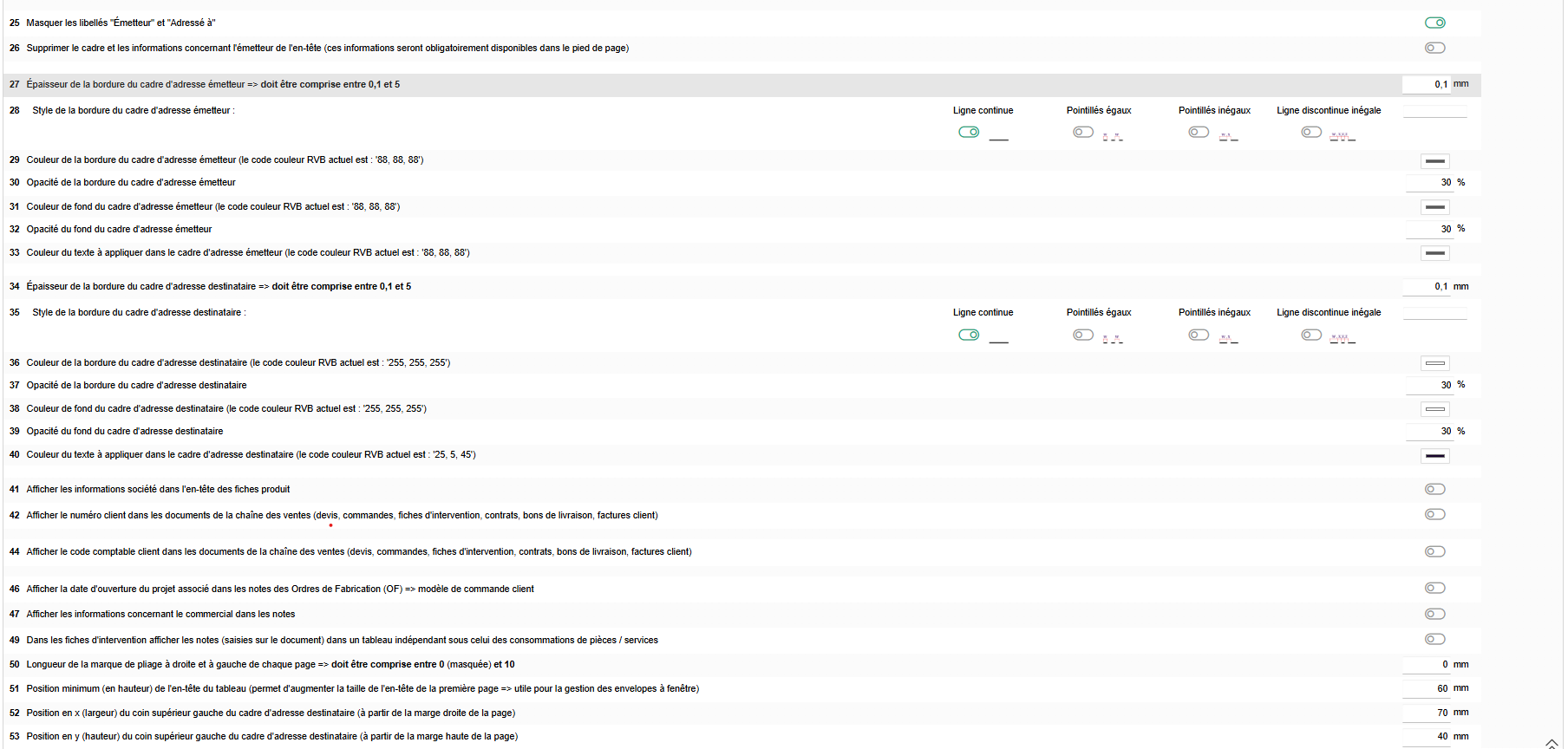
- Masquer les libellés « Émetteur » et « Adresse à ».
- Supprimer le cadre et les informations concernant l'émetteur de l'en-tête.
- **Style du cadre d'adresse émetteur** (***visible seulement si le cadre émetteur n'est pas masqué, ou si un en-tête spécial l'exige***) : épaisseur, style et couleur de la bordure (ligne continue, pointillés égaux, pointillés inégaux ou ligne discontinue inégale, avec opacité réglable), couleur et opacité du fond, couleur du texte.
- Afficher les informations société dans l'en-tête des fiches produit (si le module Produits est actif).
- Afficher le numéro client (devis, commandes, fiches d'intervention, contrats, bons de livraison, factures).
- Afficher le numéro client dans l'en-tête sous la référence client, sinon dans le cadre destinataire (visible seulement ***si l'option ci-dessus est active et que « Déplacer les informations de l'en-tête sous les adresses » est désactivée*** - cette dernière force ce réglage à Non quand elle est activée).
- Afficher le code comptable client (mêmes documents).
- Afficher le code comptable client dans l'en-tête sous la référence client, sinon dans le cadre destinataire.
- Afficher la date d'ouverture du projet associé dans les notes des Ordres de Fabrication - s'applique au modèle de commande client.
- Afficher les informations concernant le commercial dans les notes.
- Afficher le nom du commercial en gras.
- Dans les fiches d'intervention, afficher les notes dans un tableau indépendant sous celui des consommations.
- Longueur de la marque de pliage à droite et à gauche de chaque page (0 = masquée).
- **Position minimum, en hauteur, de l'en-tête du tableau :** utile pour la gestion des enveloppes à fenêtre ; toute valeur inférieure à 60 mm est automatiquement recalée à 60 mm.
- Position en X du coin supérieur gauche du cadre d'adresse destinataire, depuis la marge droite.
- Position en Y du coin supérieur gauche du cadre d'adresse destinataire, depuis la marge haute.
Cliquez sur « **Modifier** » après toute saisie qui ne s'enregistre pas automatiquement dans ce bloc.
# Chapitre 4 : Options du corps du document (colonage)
[](https://wiki.infras.fr/uploads/images/gallery/2026-07/scaled-1680-/RH383hNKPFsiBLAw-v5.png)
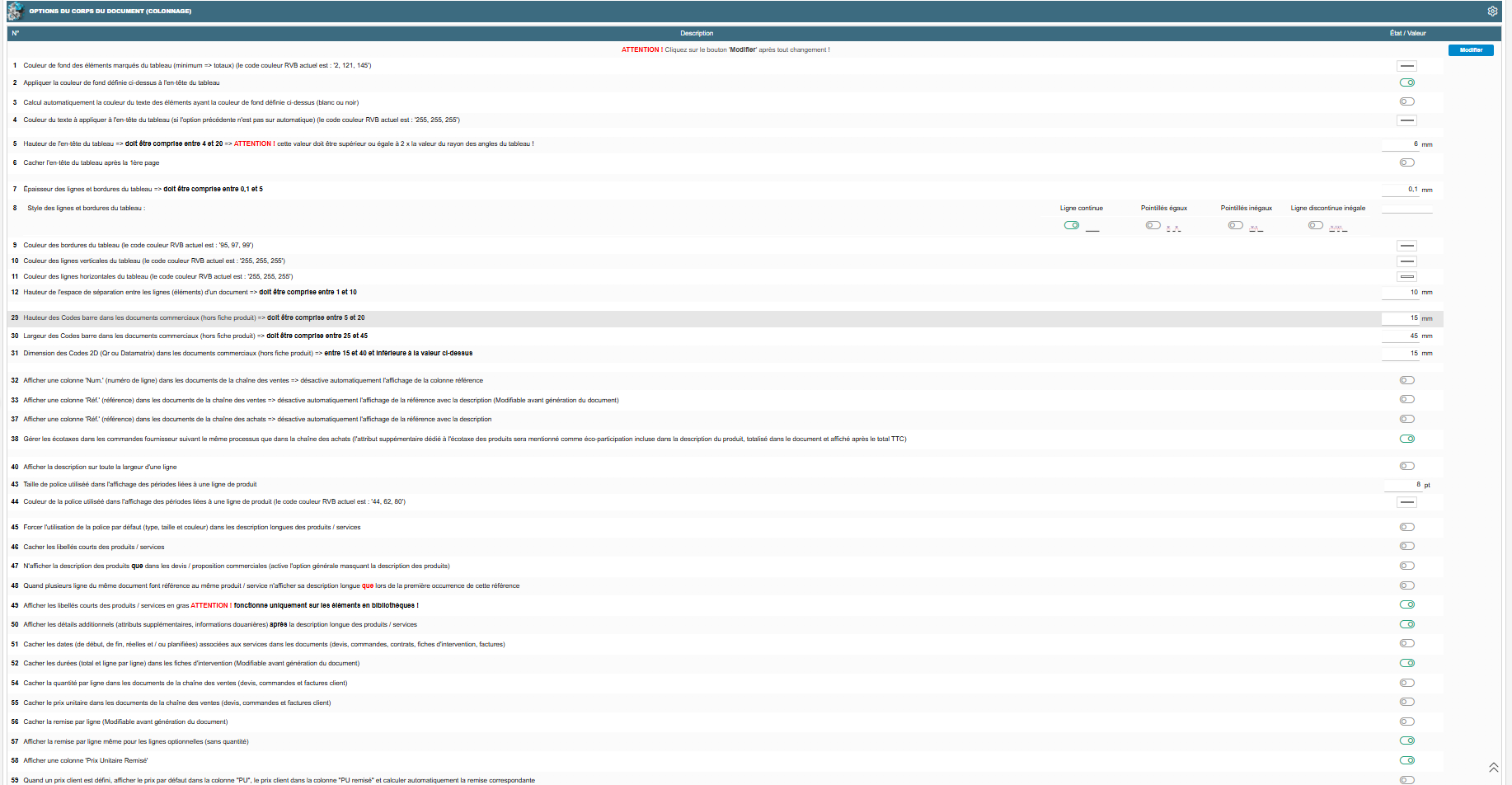
- Couleur de fond des éléments marqués du tableau (minimum de facturation, totaux).
- Appliquer cette couleur de fond à l'en-tête du tableau.
- Calculer automatiquement la couleur du texte de l'en-tête (blanc ou noir) selon le contraste.
- Couleur du texte de l'en-tête du tableau, si le calcul automatique est désactivé.
- **Hauteur de l'en-tête du tableau** - doit être supérieure ou égale à 2 fois la valeur du rayon d'arrondi des tableaux (chapitre « Apparence générale »).
- Cacher l'en-tête du tableau après la 1ère page.
- Épaisseur des lignes et bordures du tableau.
- Style des lignes et bordures du tableau : ligne continue, pointillés égaux, pointillés inégaux ou ligne discontinue inégale.
- Couleur des bordures du tableau.
- Couleur des lignes verticales du tableau.
- Couleur des lignes horizontales du tableau.
- Hauteur de l'espace de séparation entre les lignes du document - n'apparaît que si l'option native ***Dolibarr*** « traits pointillés entre les lignes » n'est pas active.
- Module Sous-Total (bloc visible uniquement si le module tiers Sous-Total est actif) :
- - - Couleur de fond des sous-titres - si l'option « Coordonner la couleur de fond des sous-totaux avec celle des sous-titres » ci-dessous est active, l'opacité de ce fond diminue automatiquement de 25 % par niveau de titre (niveau 1 = 100 %, niveau 2 = 75 %, etc.).
- Couleur du texte des sous-titres - même réglage physique que celui du module Milestone/Jalon ci-dessous (un seul réglage, deux contextes).
- Couleur du texte des sous-totaux.
- Couleur du texte de la description longue des sous-totaux.
- **Couleur de fond des sous-totaux - fait partie d'un groupe de 3 réglages mutuellement exclusifs (activer l'un remet les 2 autres à leur valeur neutre) :** désactiver l'utilisation d'une couleur de fond pour les sous-totaux, ou coordonner la couleur de fond des sous-totaux avec celle des sous-titres.
- Fusionner les sous-totaux avec les sous-titres, avec les montants affichés sur la ligne de sous-titre.
- Module Milestone/Jalon (bloc visible uniquement si ce module est actif) :
- - - Couleur du texte des sous-titres Jalon (même réglage que ci-dessus).
- Module Ouvrage/Forfait, éditeur Inovea (bloc visible uniquement si ce module est actif) :
- - - Couleur de fond des ouvrages.
- Couleur du texte des ouvrages.
- Style du texte des ouvrages (B = gras, U = souligné, I = italique, combinables).
- Appliquer le style standard aux descriptions longues, sinon le style ci-dessus s'applique aussi à la description longue.
- Symbole de puce des détails d'ouvrage, vide pour une simple indentation - choix parmi >>, >, => ou ¤ (défaut ¤).
- Hauteur de l'espace entre les détails d'un ouvrage.
- Regrouper les lignes de détail des ouvrages au statut « Caché ».
- Codes-barres et codes 2D (bloc visible uniquement si le module Codes-barres est actif) :
- - - Hauteur des codes-barres (documents commerciaux, hors fiche produit).
- Largeur des codes-barres.
- Dimension des codes 2D (QR/Datamatrix) - automatiquement plafonnée à la valeur de largeur de code-barres ci-dessus si les deux sont renseignées.
- Afficher une colonne « Num. » (numéro de ligne) - désactive automatiquement la colonne « Réf. » ci-dessous.
- Afficher une colonne « Réf. » (référence produit), modifiable avant génération du document - désactive automatiquement la référence intégrée à la description, force le masquage de la référence native Dolibarr, et désactive automatiquement la colonne « Num. » ci-dessus (les deux colonnes sont mutuellement exclusives).
- Ajouter à la référence produit le gencode, c'est-à-dire la valeur chiffrée du code-barres (si la colonne référence et le module Codes-barres sont actifs).
- **Forcer l'alignement de la colonne Num./Réf. :** gauche, centre ou droite (si l'une des deux colonnes est active).
- Afficher le numéro de ligne ou la référence en gras (même condition).
- Afficher une colonne « Réf. » dans les documents d'achat.
- Gérer les écotaxes dans les commandes fournisseur comme dans les achats, avec la mention « éco-participation incluse », totalisée et affichée après le total TTC (si l'attribut supplémentaire écotaxe est configuré).
- **Forcer l'alignement de la colonne « Unité » :** gauche, centre ou droite (si la gestion des unités de mesure est active).
- Afficher la description sur toute la largeur d'une ligne.
- Largeur de la ligne de séparation associée.
- Couleur de la ligne de séparation associée.
- Taille de police des périodes liées à une ligne de produit.
- Couleur de police des périodes.
- Forcer la police par défaut dans les descriptions longues, en ignorant tout style HTML embarqué.
- Cacher les libellés courts des produits/services - désactive l'affichage des 3 options suivantes tant qu'il est actif :
- - - N'afficher la description que dans les devis.
- N'afficher la description longue que lors de la première occurrence d'un même produit.
- Afficher les libellés courts en gras, ce qui fonctionne uniquement sur les éléments en bibliothèque.
- Afficher les détails additionnels (attributs supplémentaires, informations douanières) après la description longue.
- Cacher les dates de service (début, fin, réelles, planifiées - devis, commandes, contrats, fiches d'intervention, factures).
- Cacher les durées dans les fiches d'intervention, total et par ligne, modifiable avant génération (si le module Fiches d'intervention est actif).
- Afficher les horaires de début/fin d'intervention, onglet rapport (si le module Management est actif).
- Cacher la quantité par ligne (devis, commandes, factures client).
- **Cacher le prix unitaire (devis, commandes, factures client)** - force à Non si la remise automatique (ci-dessous) est active.
- **Cacher la remise par ligne, modifiable avant génération du document** - force à Non si la remise automatique est active ; lorsqu'elle est active, l'option suivante n'est plus affichée.
- Afficher la remise même pour les lignes optionnelles, sans quantité (si « Cacher la remise » est désactivée).
- **Afficher une colonne « Prix Unitaire Remisé »** - force à Oui si la remise automatique est active.
[](https://wiki.infras.fr/uploads/images/gallery/2026-07/scaled-1680-/EajOzfOAOcrUsTOC-v6.png)
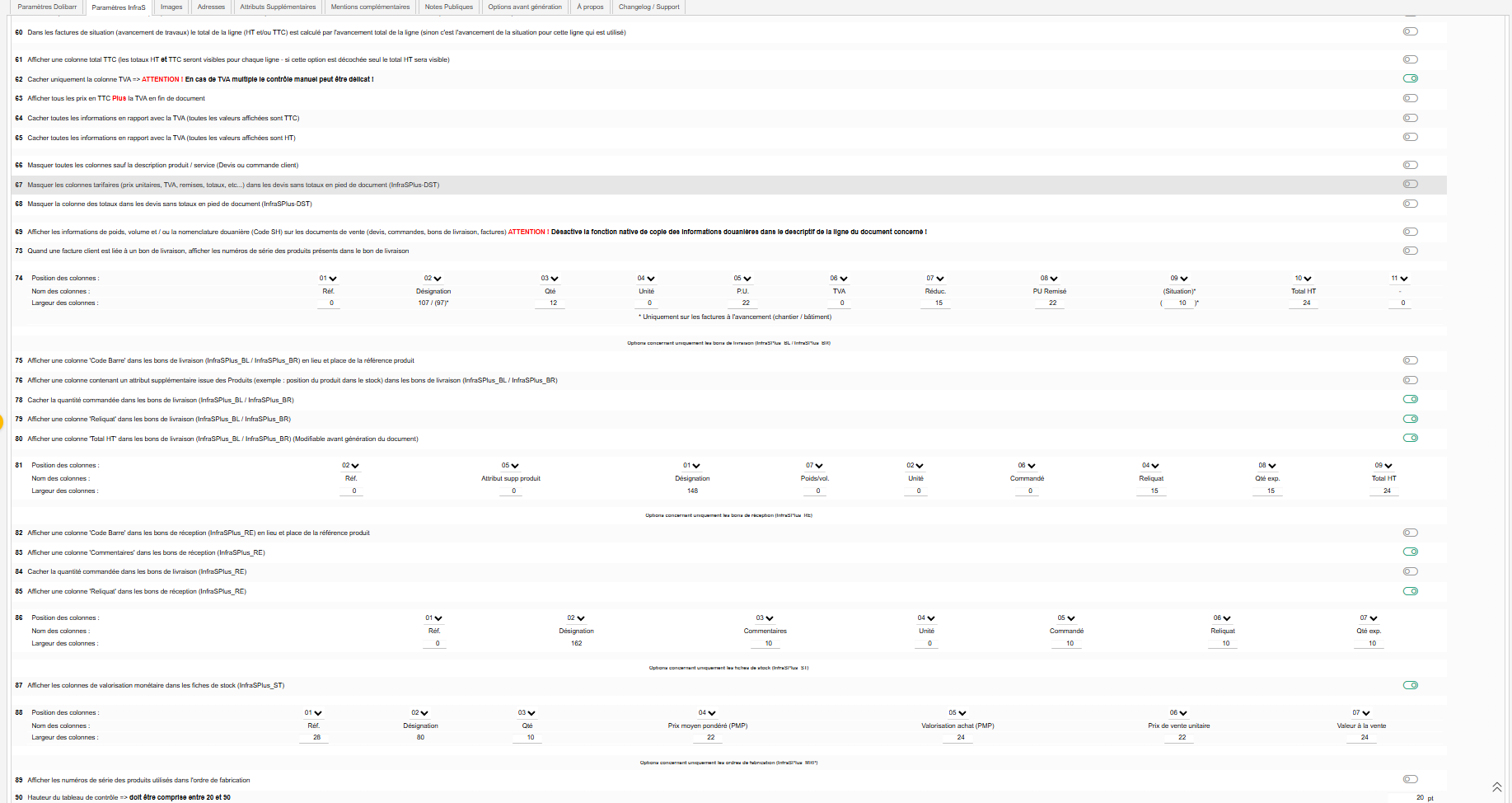
- **Prix client automatique :** afficher le prix par défaut en « PU », le prix client en « PU remisé », avec calcul automatique de la remise (visible seulement si le module Tarifs clients est actif, sinon automatiquement désactivée). Force automatiquement l'affichage du prix unitaire, de la remise et du prix unitaire remisé (3 réglages ci-dessus).
- **Factures de situation :** calculer le total de ligne par l'avancement total de la ligne plutôt que par l'avancement de la situation (si les factures de situation sont actives).
- Afficher une colonne total TTC, sinon seul le total HT est visible.
- Cacher uniquement la colonne TVA - attention, en cas de TVA multiple, le contrôle manuel des montants peut être délicat.
- **Afficher tous les prix en TTC, plus la TVA en fin de document :** bascule l'ensemble des montants du tableau en TTC, la TVA étant reportée uniquement dans le total de fin de document.
- Cacher toutes les informations de TVA, montants en TTC uniquement.
- Cacher toutes les informations de TVA, montants en HT uniquement.
- Masquer toutes les colonnes sauf la description (devis et commandes clients).
- Masquer les colonnes tarifaires sur les devis « InfraSPlus-DST », modèle de devis sans totaux en pied.
- **Masquer uniquement la colonne des totaux sur ces mêmes devis** (***visible seulement si l'option ci-dessus est désactivée***).
- Afficher les informations de poids, volume et/ou nomenclature douanière (Code SH) sur devis, commandes, bons de livraison, factures. Désactive la fonction native de copie de ces informations dans le descriptif de ligne. N'apparaît que si au moins une caractéristique produit correspondante n'est pas désactivée globalement côté ***Dolibarr***.
- Ne pas afficher ces informations quand le pays du client est le même que celui du vendeur.
- Masquer les lignes de séparation.
- Types de documents concernés par défaut (Devis, Commandes, Expéditions, Factures) - un interrupteur par type de document, actif seulement si le module ***Dolibarr*** correspondant l'est.
- Afficher les numéros de série sur facture liée à un bon de livraison (si le module Lots/Séries est actif).
- Colonage général (devis, commandes, factures - hors bons de livraison/réception) : chaque colonne dispose d'un numéro d'ordre d'affichage (fond rouge en cas de doublon), d'un nom et d'une largeur en mm.
1. 1. \* Réf. / Num. — largeur par défaut 28 mm ; verrouillée à 0 si aucune colonne Réf./Num./Réf. fournisseur n'est active.
2. \* Désignation — occupe l'espace restant, non éditable.
3. \* Qté — largeur par défaut 10 mm ; verrouillée à 0 si la quantité est masquée.
4. \* Unité — largeur par défaut 10 mm ; verrouillée à 0 si les unités ne sont pas actives.
5. \* Prix U. — largeur par défaut 22 mm ; verrouillée à 0 si le PU est masqué.
6. \* TVA — largeur par défaut 14 mm ; verrouillée à 0 si une option masquant la TVA est active.
7. \* Remise — largeur par défaut 14 mm ; verrouillée à 0 si les remises sont masquées.
8. \* PU Remisé — largeur par défaut 22 mm ; verrouillée à 0 si non activée ou remises masquées.
9. \* Progression (facturation à l'avancement uniquement) — largeur par défaut 10 mm.
10. \* Total — largeur par défaut 24 mm ; toujours éditable.
11. \* Total TTC — largeur par défaut 24 mm ; verrouillée à 0 si la colonne Total TTC n'est pas activée.
***Sous-section : Expéditions (options concernant uniquement les bons de livraison InfraSPlus\_BL / InfraSPlus\_BR).***
- Afficher une colonne « Code Barre » qui remplace la référence produit.
- Afficher une colonne d'attribut supplémentaire produit, par exemple la position du produit en stock.
- Code de l'attribut supplémentaire à afficher (visible si l'option ci-dessus est active) - un bouton « Créer l'attribut supplémentaire » apparaît tant que l'extrafield n'existe pas.
- Cacher la quantité commandée.
- Afficher une colonne « Reliquat ».
- Afficher une colonne « Total HT », modifiable avant génération du document.
1. 1. \* Réf. / Code Barres — largeur par défaut 28 mm ; verrouillée à 0 si ni Réf. ni Code Barre ne sont actifs.
2. \* Attribut supp. — largeur par défaut 14 mm ; verrouillée à 0 si l'attribut n'est pas activé.
3. \* Désignation — occupe l'espace restant.
4. \* Poids/Volume — largeur par défaut 22 mm ; verrouillée à 0 si l'option native masquant poids/volume est active.
5. \* Unité — largeur par défaut 10 mm ; verrouillée à 0 si les unités ne sont pas actives.
6. \* Commande — largeur par défaut 10 mm ; verrouillée à 0 si masquée.
7. \* Reliquat — largeur par défaut 10 mm ; verrouillée à 0 si non activée.
8. \* Qté expédiée — largeur par défaut 10 mm ; toujours éditable.
9. \* Total HT — largeur par défaut 24 mm ; verrouillée à 0 si non activée.
***Sous-section : Réceptions (options concernant uniquement les bons de réception InfraSPlus\_RE).***
- Afficher une colonne « Code Barre » qui remplace la référence produit.
- Afficher une colonne « Commentaires ».
- Cacher la quantité commandée.
- Afficher une colonne « Reliquat ».
1. 1. \* Réf. / Code Barre — largeur par défaut 28 mm ; verrouillée à 0 sauf si Réf. ou Code Barre actif.
2. \* Désignation — occupe l'espace restant.
3. \* Commentaires — largeur par défaut 50 mm ; verrouillée à 0 sauf si activée.
4. \* Unité — largeur par défaut 10 mm ; verrouillée à 0 si les unités ne sont pas actives.
5. \* Commande — largeur par défaut 10 mm ; verrouillée à 0 si masquée.
6. \* Reliquat — largeur par défaut 10 mm ; verrouillée à 0 sauf si activée.
7. \* Qté réceptionnée — largeur par défaut 10 mm ; toujours éditable.
***Sous-section : Stock (options concernant uniquement les fiches de stock InfraSPlus\_ST, section visible seulement si le module Stock est actif).***
- Afficher les colonnes de valorisation monétaire - active ou désactive les colonnes PMP, valorisation achat et valeur à la vente ci-dessous.
1. 1. \* Réf. — largeur par défaut 28 mm.
2. \* Désignation — occupe l'espace restant.
3. \* Qté — largeur par défaut 10 mm.
4. \* Prix moyen pondéré (PMP) — largeur par défaut 22 mm ; verrouillée à 0 sauf si valorisation active.
5. \* Valorisation achat (PMP) — largeur par défaut 24 mm ; verrouillée à 0 sauf si valorisation active.
6. \* Prix de vente unitaire — largeur par défaut 22 mm.
7. \* Valeur à la vente — largeur par défaut 24 mm ; verrouillée à 0 sauf si valorisation active.
***Sous-section : Ordres de fabrication / nomenclatures (MRP) (options concernant uniquement les ordres de fabrication InfraSPlus\_MRP, section visible seulement si le module MRP/Nomenclatures est actif).***
- Afficher les numéros de série des produits utilisés (si le module Lots/Séries est actif).
- Hauteur du tableau de contrôle.
- Afficher la colonne des dimensions - active la colonne « Taille » ci-dessous.
1. 1. \* Réf. — largeur par défaut 28 mm.
2. \* Désignation — occupe l'espace restant.
3. \* Qté (quantité unitaire nécessaire) — largeur par défaut 10 mm.
4. \* Qté totale (quantité unitaire x quantité à produire) — largeur par défaut 22 mm.
5. \* Unité — largeur par défaut 10 mm ; verrouillée à 0 si les unités ne sont pas actives.
6. \* Taille — largeur par défaut 24 mm ; verrouillée à 0 sauf si « colonne dimensions » active.
***Sous-section : Étiquette utilisateur (options concernant uniquement les cartes utilisateur InfraSPlus\_UST).***
- Format à utiliser pour les cartes utilisateur, parmi les formats de papier/étiquette standards.
- Titre à afficher en 1ère ligne, centré ; vide signifie le nom de la société.
- Afficher la photo de l'utilisateur, au format photo d'identité, en bas à gauche.
- Afficher le poste ou la fonction de l'utilisateur, en 2e ligne, à droite de la photo.
- Afficher le numéro de téléphone de la société, en 3e ligne.
- Afficher l'e-mail de la société, en 4e ligne.
- Afficher le logo de la société, en bas à droite.
Cliquez sur « **Modifier** » après toute saisie qui ne s'enregistre pas automatiquement dans ce bloc.
# Chapitre 5 : Options du pied de document
[](https://wiki.infras.fr/uploads/images/gallery/2026-07/scaled-1680-/WQ4jOb3yRiIIvJZp-v7.png)
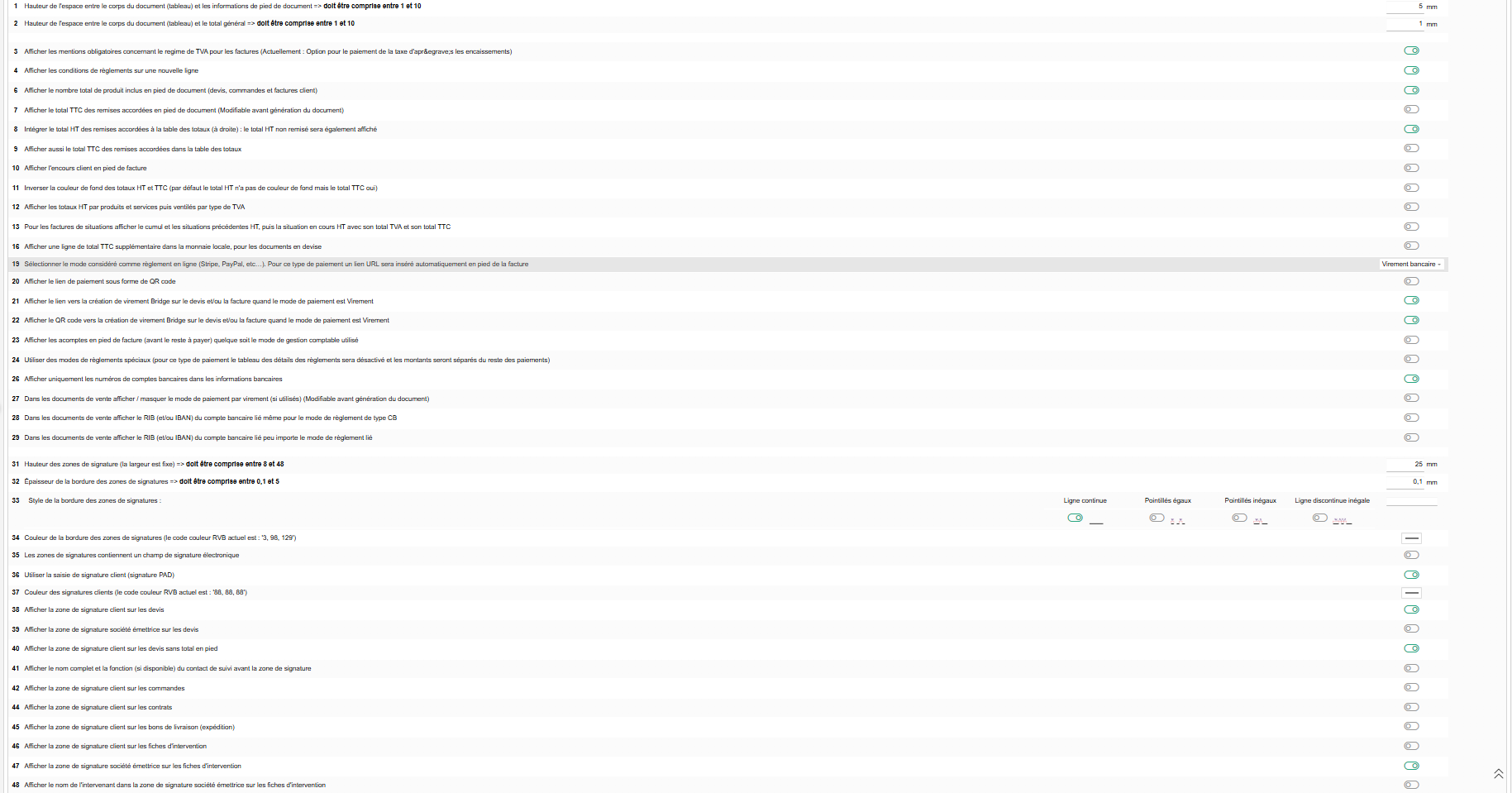
- Hauteur de l'espace entre le tableau et les informations de pied de document.
- Hauteur de l'espace entre le tableau et le total général.
- Afficher les mentions obligatoires du régime de TVA (factures) le libellé rappelle dynamiquement le régime configuré sur l'instance (débits/encaissements).
- Afficher les conditions de règlement sur une nouvelle ligne (visible sauf si les conditions de règlement sont totalement masquées).
- Afficher un code de ***« communication structurée »*** sur les factures, pour les sociétés belges uniquement.
- Afficher le nombre total de produits en pied de document (devis, commandes, factures client).
- Afficher le total TTC des remises en pied de document, modifiable avant génération du document. Mutuellement exclusif avec l'option suivante (activer l'une désactive l'autre).
- Intégrer le total HT des remises dans le tableau des totaux, avec rappel du total HT brut. Mutuellement exclusif avec l'option précédente.
- Afficher aussi le total TTC des remises dans le tableau des totaux (visible seulement si l'option ci-dessus est active).
- Afficher l'encours client en pied de facture.
- Inverser la couleur de fond des totaux HT et TTC (par défaut, seul le TTC a un fond).
- Ventiler les totaux HT par produits/services puis par taux de TVA.
- **Factures de situation :** détailler cumul, situations précédentes et situation en cours (HT, TVA, TTC), si les factures de situation sont actives.
- Utiliser la gestion de TVA forfaitaire, pour les sociétés suisses non assujetties à la TVA uniquement.
- Taux de TVA forfaitaire (si l'option ci-dessus est active).
- Afficher un total TTC supplémentaire en monnaie locale pour les documents en devise étrangère (si le module Multidevises est actif).
- Afficher la mention « Arrêté à » suivie du Total TTC en toutes lettres (visible seulement si le module externe numberwords est installé et actif sinon automatiquement désactivée avec message d'erreur). Un lien de téléchargement du module est proposé si absent.
- Imprimer un QR code EPC de paiement européen sur les factures (Belgique, Pays-Bas, Allemagne, Autriche, Finlande).
- Mode de règlement considéré comme paiement en ligne (Stripe, PayPal, etc.) insère automatiquement un lien de paiement en pied de facture.
- Afficher le lien de paiement sous forme de QR code (si un mode est sélectionné ci-dessus).
- Afficher le lien de virement Bridge sur facture/devis en mode Virement (si le module externe ***infras2bridge*** est actif).
- Afficher le QR code de virement Bridge sur facture/devis en mode Virement (même condition).
- Afficher les acomptes en pied de facture avant le reste à payer, quel que soit le mode comptable.
- Utiliser des modes de règlement spéciaux le tableau de détail des règlements est désactivé et les montants sont séparés.
- Modifier le mode considéré comme règlement spécial via une action dédiée, avec un bouton « Modifier » séparé (visible si l'option ci-dessus est active et qu'un mode spécial est déjà configuré).
- Afficher uniquement les numéros de comptes bancaires, en masquant les autres coordonnées.
- Masquer le RIB/IBAN du mode de règlement par virement, modifiable avant génération du document.
- Afficher aussi le RIB/IBAN quand le mode de règlement est Carte Bancaire (si l'option ci-dessus est désactivée).
- Afficher le RIB/IBAN quel que soit le mode de règlement (même condition).
- Positionner le cachet de scellement électronique UpToSign via le mot-clé **UPTOSIGN\_STAMP\_HERE**, dans la zone d'informations en pied de facture (si le module tiers uptosign est actif).
#### **Zones de signature :**
- Hauteur des zones de signature (largeur fixe).
- Épaisseur de la bordure.
- Style de la bordure : ligne continue, pointillés égaux, pointillés inégaux ou ligne discontinue inégale.
- Couleur de la bordure.
- Inclure un champ de signature électronique.
- Utiliser la saisie de signature client via un pad de signature.
- Couleur des signatures clients (si l'option ci-dessus est active).
- Afficher la zone de signature client sur les devis.
- Afficher la zone de signature société émettrice sur les devis (si l'option ci-dessus est active).
- Afficher la zone de signature client sur les devis sans total en pied.
- Afficher le nom et la fonction du contact de suivi avant la zone de signature (si l'une des deux zones de signature devis ci-dessus est active).
- Afficher la zone de signature client sur les commandes.
- Ajouter une 2e zone de signature Tiers/sous-traitant, pour les ordres de fabrication issus de commandes et les bons de livraison (si le module customlink est actif).
- Afficher la zone de signature client sur les contrats.
- Afficher la zone de signature client sur les bons de livraison.
- Afficher la zone de signature client sur les fiches d'intervention.
- Afficher la zone de signature société émettrice sur les fiches d'intervention.
- Afficher le nom de l'intervenant à côté de cette zone (si l'option ci-dessus est active).
Les cases à cocher enregistrent immédiatement. Cliquez sur « **Modifier** » pour les autres champs de ce bloc.
# Chapitre 6 : Options du pied de page
[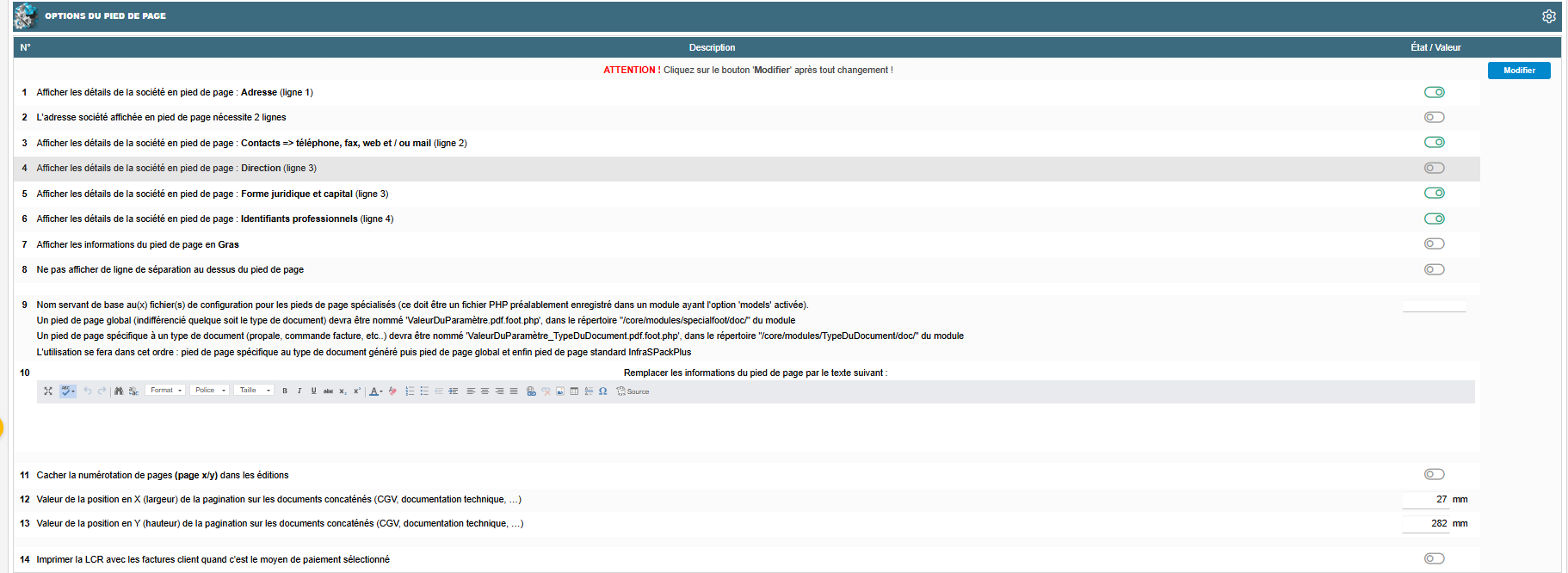](https://wiki.infras.fr/uploads/images/gallery/2026-07/scaled-1680-/nwl8vjgdxwlP05lH-v8.png)
- **Adresse :** affiche l'adresse de la société en pied de page, en ligne 1. Non modifiable si le cadre émetteur de l'en-tête est affiché (voir chapitre « Haut de page »).
- Adresse société sur 2 lignes (si l'option ci-dessus est active).
- **Contacts :** téléphone, fax, web, mail, en ligne 2.
- Direction, en ligne 3.
- Forme juridique et capital, en ligne 3.
- Identifiants professionnels, en ligne 4.
- **Gras :** affiche les informations du pied de page en gras.
- Pas de ligne de séparation.
- **Pied de page spécialisé :** nom de base d'un fichier PHP enregistré dans un module ayant l'option « models » activée.
- Texte libre de pied de page (visible seulement si aucun pied de page spécialisé n'est renseigné) remplace les informations du pied de page par ce texte.
- Cacher la numérotation de page.
- Position X de la pagination pour les documents concaténés.
- Position Y de la pagination.
- Afficher la LCR imprime la LCR avec les factures client quand c'est le mode de paiement sélectionné.
Cliquez sur « **Modifier** » après toute saisie qui ne s'enregistre pas automatiquement (pied de page spécialisé, texte libre, positions X/Y de la pagination).
# Paramètres InfraS - Gestion de l'Impression
[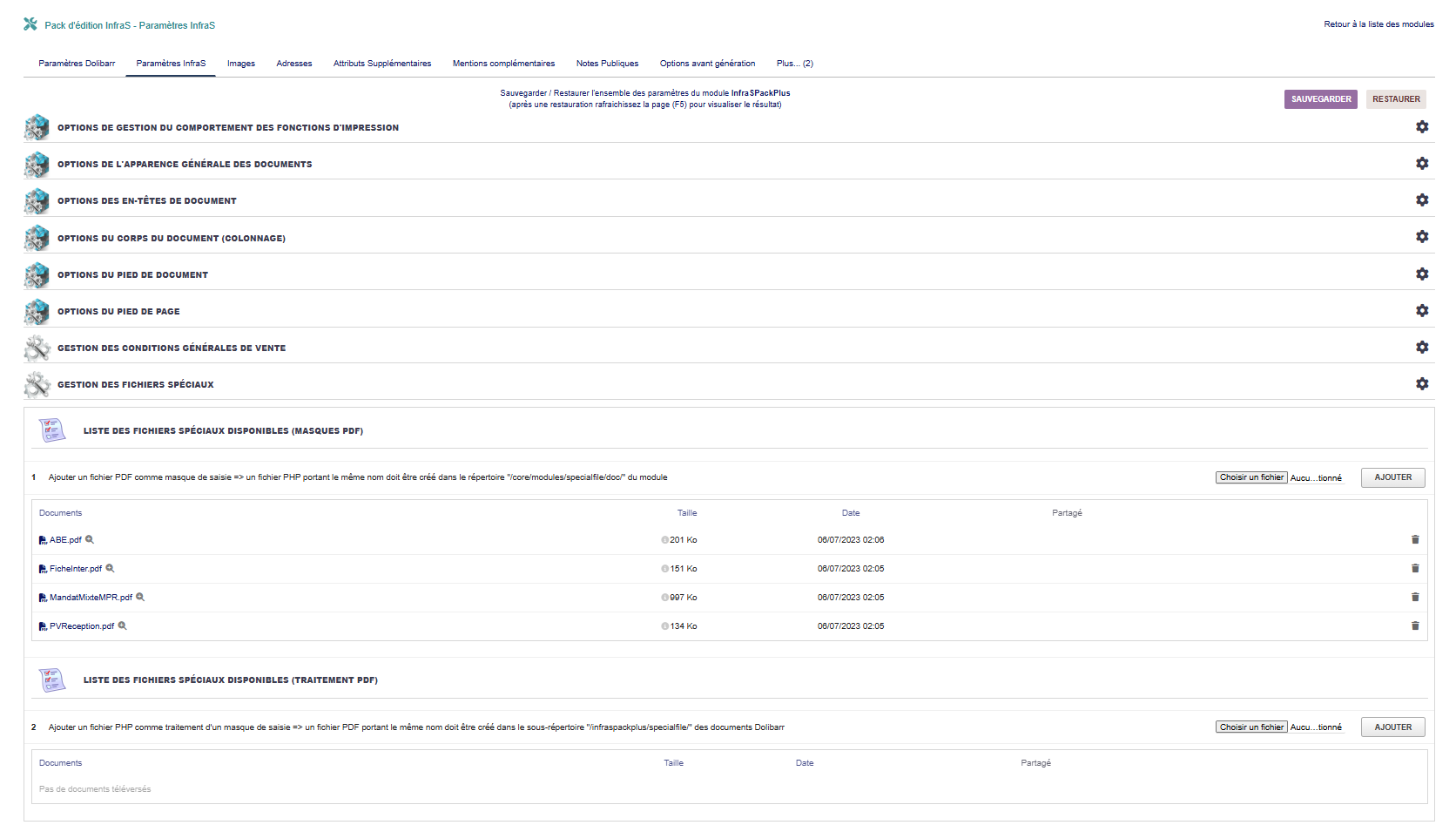](https://wiki.infras.fr/uploads/images/gallery/2026-02/scaled-1680-/mjggzuKU1Rqsru7g-paramsinfras.png)
#### **ACTIVATION ET GÉNÉRATION**
| **Option**
| **Description**
|
|---|
| **\[1\]**
| **Activer les modèles InfraS par défaut**
Définir les modèles InfraSPlus comme modèles par défaut pour tous les documents
|
| **\[2\]**
| **Génération semi-automatique à la validation**
Générer automatiquement le PDF lors de la validation du document
**⚠ Fonction ACTIVE par défaut pour des raisons d'ergonomie**
|
| **\[3\]**
| **Génération auto - notes publiques**
Régénérer le PDF à la modification des notes publiques manuelles
|
| **\[4\]**
| **Génération auto - attributs supplémentaires**
Régénérer le PDF à la modification des attributs supplémentaires du document
|
| **\[5\]**
| **Génération auto - champs modifiables**
Régénérer à l'enregistrement des champs modifiables après validation (date fin validité, conditions règlement, mode règlement, date expédition/livraison, délai livraison, compte bancaire)
|
| **\[6\]**
| **Génération automatique "à la volée"**
Activer/Désactiver la génération automatique des PDF
|
| **\[7\]**
| **Enregistrer plusieurs fichiers PDF**
Un fichier par modèle et par document (si plusieurs modèles disponibles)
|
| **\[8\]**
| **Horodater les fiches projet**
Ajouter un horodatage au nom du fichier pour garder un historique d'évolution
|
#### **FUSION DE DOCUMENTS**
| **Option**
| **Description**
|
|---|
| **\[9\]**
| **Pièces jointes du projet**
Proposer les pièces jointes du projet associé comme fichiers fusionnables
|
| **\[10\]**
| **Pièces jointes nomenclature (OF)**
Dans les ordres de fabrication, proposer les pièces jointes de la nomenclature
|
| **\[11\]**
| **Devis en prix brut**
Créer un document supplémentaire sans remise ni tarif client (prix de vente par défaut)
|
| **\[12\]**
| **Fusion documentation produit**
Gérer la fusion de la documentation produit/service depuis les paramètres finaux (case à cocher)
|
| **\[13\]**
| **Vérifier fichiers en double**
Le fichier ne sera fusionné qu'une seule fois (nom identique, références produit différentes)
|
| **\[14\]**
| **Attestation de TVA**
Proposer l'attestation de TVA comme fichier fusionnable dans les devis
**(Requiert le module externe Attestation de TVA - Iouston)**
|
#### **DÉCIMALES**
**Forcer le nombre de décimales affichées :**
| **\[15\]**
| **Prix unitaires**
Nombre de décimales pour les prix unitaires (ex: 2 = 10.50 €)
|
| **\[16\]**
| **Prix totaux (lignes)**
Nombre de décimales pour les totaux de ligne
|
| **\[17\]**
| **Totaux (document)**
Nombre de décimales pour les totaux généraux du document
|
***Conseil - Génération automatique***
La génération semi-automatique est activée par défaut car elle améliore considérablement l'expérience utilisateur :
- Les utilisateurs n'ont pas à penser à régénérer le PDF après modifications
- Le document PDF est toujours à jour avec les dernières modifications
- Évite les erreurs d'envoi de documents obsolètes
- Gain de temps significatif pour les utilisateurs
**Note :** Vous pouvez forcer ce choix si nécessaire via l'option **\[2\]**.
***Cas d'usage - Multi-modèles***
L'option **\[7\]** "Enregistrer plusieurs fichiers PDF" est particulièrement utile dans ces situations :
- **Version client / Version interne** : Un modèle détaillé pour usage interne et un modèle simplifié pour le client
- **Langues différentes** : Un modèle par langue si vous gérez plusieurs langues
- **Formats différents** : Version standard et version avec détails techniques
- **Archivage** : Conserver plusieurs versions du même document
***Attention - Performance***
Certaines options peuvent impacter les performances :
- **Génération automatique intensive** : Si activée sur tous les événements, peut ralentir l'interface sur du matériel ancien
- **Multi-modèles** : Générer plusieurs PDF simultanément augmente le temps de traitement
- **Fusion de nombreux documents** : La fusion de multiples fichiers volumineux peut prendre du temps
**Recommandation :** Commencez avec les options de base et ajoutez progressivement les fonctionnalités avancées selon vos besoins.
# 06. GESTION DES IMAGES
# Gestion des Images
**Accès :** Menu *InfraS → InfraSPackPlus → Paramètres Images*
[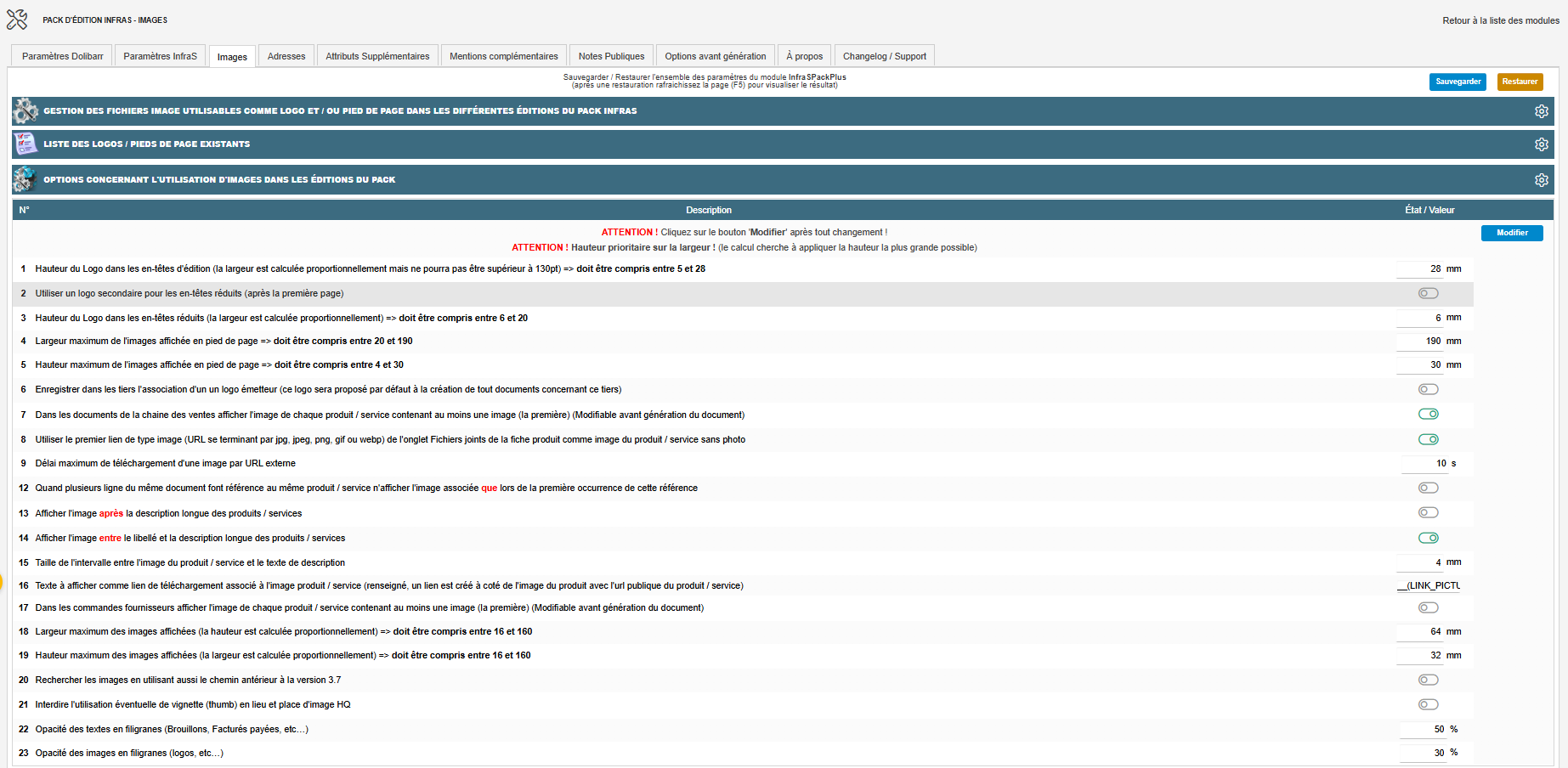](https://wiki.infras.fr/uploads/images/gallery/2026-07/scaled-1680-/k8bqpM7qqCEywy8x-v9.png)
#### **GESTION DES FICHIERS IMAGE**
| **Option**
| **Description**
|
|---|
| **\[1\]**
| **Gérer les logos / images**
Téléchargement, nommage et effacement des fichiers image
|
| **\[2\]**
| **Image de pied de page par défaut**
Choisir un fichier à afficher en pied de page (logos partenaires, etc.)
|
| **\[3\]**
| **Image de filigrane par défaut**
Choisir une image à afficher en filigrane sur tous les documents
|
| **\[4\]**
| **Filigrane cartes utilisateur**
Image en filigrane spécifique pour les cartes utilisateur (InfraSPlus\_UST)
|
| **\[5\]**
| **Logo secondaire**
Logo à afficher sur les en-têtes réduits (après la première page)
|
| **\[6\]**
| **Image zone signature société**
Image à inclure dans la zone de signature émettrice (cachet et/ou signature)
|
#### **OPTIONS D'UTILISATION - LOGOS**
| **Option**
| **Description**
|
|---|
| **\[1\]**
| **Hauteur du logo principal**
Valeur entre 10 et 50. Largeur calculée proportionnellement (max 130)
|
| **\[2\]**
| **Logo secondaire pour en-têtes réduits**
Utiliser un logo différent après la première page
|
| **\[3\]**
| **Hauteur logo secondaire**
Taille du logo pour les en-têtes réduits
|
#### **OPTIONS D'UTILISATION - IMAGES DE PIED DE PAGE**
| **Option**
| **Description**
|
|---|
| **\[4\]**
| **Largeur maximale pied de page**
Hauteur calculée proportionnellement
|
| **\[5\]**
| **Borner la hauteur maximale**
Limiter la hauteur de l'image (largeur calculée proportionnellement)
|
| **\[6\]**
| **Logo par défaut pour tiers**
Dans les tiers, enregistrer un logo comme défaut pour ce client spécifique
|
#### **OPTIONS D'UTILISATION - IMAGES PRODUITS**
| **Option**
| **Description**
|
|---|
| **\[7\]**
| **Afficher images produits (ventes)**
Afficher la première image de chaque produit/service dans les documents de vente
|
| **\[8\]**
| Utiliser le premier lien image (URL en .jpg/.jpeg/.png/.gif/.webp) de l'onglet Fichiers joints comme image de secours.
|
| **\[9\]**
| Délai maximum de téléchargement d'une image par URL externe (si l'option ci-dessus est active). Valeur par défaut 10 s si non renseignée.
|
| **\[10\]**
| **Image dans colonne référence**
Afficher l'image dans la colonne référence (ou numéro de ligne)
|
| **\[11\]**
| **Image seule dans colonne référence**
L'image remplace la référence ou le numéro de ligne
|
| **\[12\]**
| **Image unique pour produit répété**
N'afficher qu'une fois l'image d'un produit utilisé plusieurs fois
|
| **\[13\]**
| **Image après description**
Afficher l'image après la description longue des produits
|
| **\[14\]**
| **Image entre libellé et description**
Positionner l'image entre le libellé court et la description longue
|
| **\[15\]**
| **Intervalle image-texte**
Taille de l'espace entre l'image et le texte de description
|
| **\[16\]**
| **Texte lien téléchargement**
Créer un lien avec l'URL publique du produit/service associé à l'image
|
| **\[17\]**
| **Images commandes fournisseurs**
Afficher l'image de chaque produit dans les commandes fournisseur
|
| **\[18\]**
| **Largeur maximale images**
Hauteur calculée proportionnellement
|
| **\[19\]**
| **Borner hauteur maximale images**
Limiter la hauteur des images (largeur calculée proportionnellement)
|
| **\[20\]**
| **Chemin antérieur v3.7**
Rechercher les images en utilisant aussi l'ancien chemin (compatibilité)
|
| **\[21\]**
| **Interdire vignettes (thumb)**
Utiliser uniquement les images haute qualité
|
#### **OPTIONS D'UTILISATION - FILIGRANES**
| **Option**
| **Description**
|
|---|
| **\[22\]**
| **Opacité filigrane texte**
Régler la transparence du texte en filigrane (0 à 100%)
|
| **\[23\]**
| **Opacité filigrane image**
Régler la transparence de l'image de fond (0 à 100%)
|
| **\[24\]**
| **Fixer largeur signature émetteur**
Dimensions correspondant aux dimensions physiques (utile pour les cachets)
|
***Bonnes Pratiques - Images***
- **Format PNG** recommandé pour les logos (fond transparent)
- **Format JPG** recommandé pour les photos produits (taille réduite)
- **Résolution optimale** : 150-300 DPI pour un rendu professionnel
- **Taille fichier** : Éviter les images trop volumineuses (max 2 Mo par image)
- **Nommage** : Utiliser des noms explicites et sans caractères spéciaux
- **HQ vs Miniatures** : Les miniatures accélèrent l'affichage mais réduisent la qualité
***Cas d'usage - Images produits***
**Différentes présentations possibles :**
**Présentation catalogue** Image dans colonne référence **\[Ligne 8\]**. Idéal pour les devis visuels
**Présentation technique** Image après description **\[Ligne 11\]**. Idéal pour la documentation
**Présentation mixte** Image entre libellé et description **\[Ligne 12\]**. Équilibre entre visuel et textuel
**Présentation minimaliste** Image seule dans référence **\[Ligne 9\]**. Design épuré
# 07. GESTION DES ADRESSES MULTIPLES
# Gestion des Adresses
**Accès :** Menu **InfraS → InfraSPackPlus → Paramètres Adresses**
[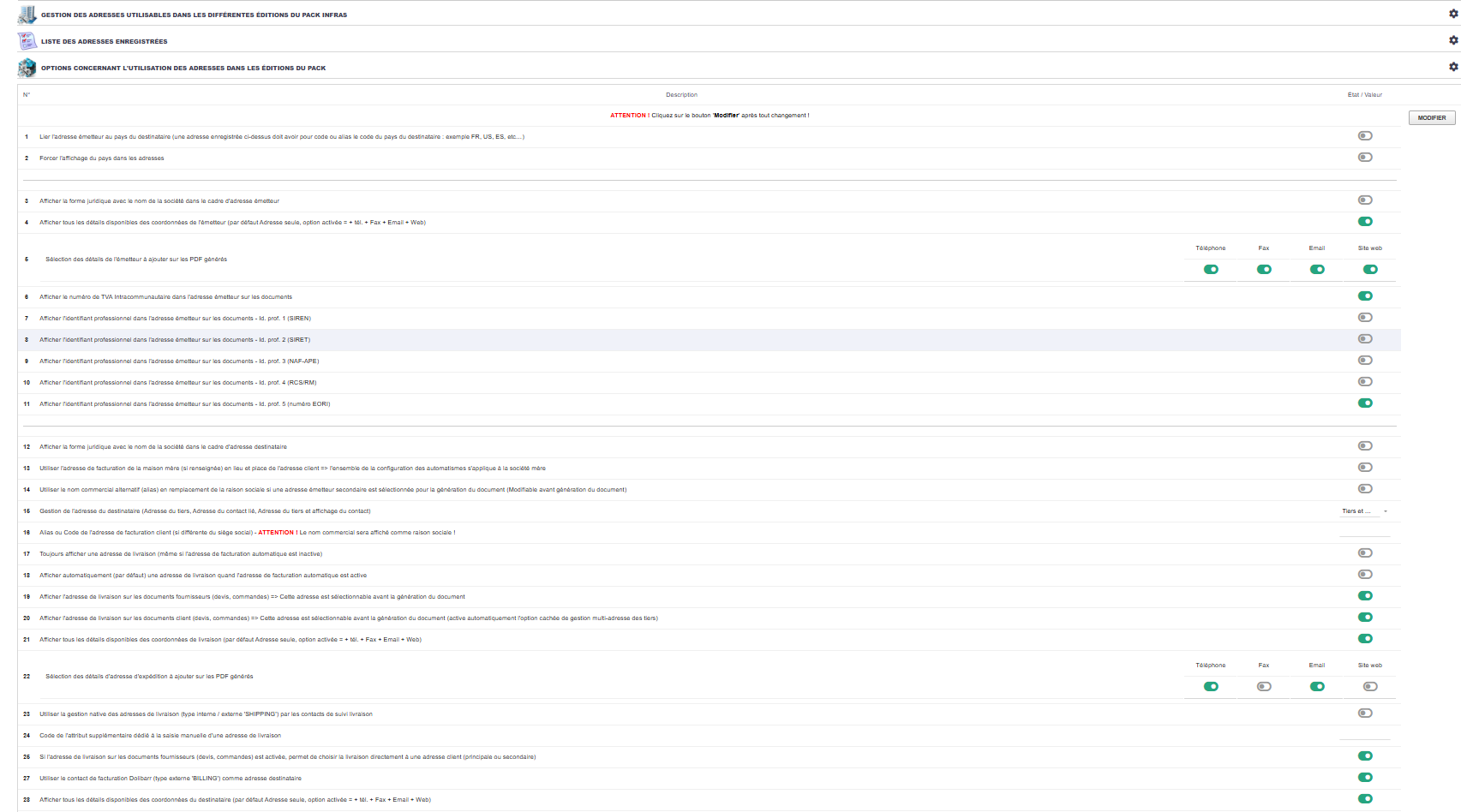](https://wiki.infras.fr/uploads/images/gallery/2026-04/scaled-1680-/EOle0ElrgRivCQ2E-plusparam.png)
#### **FONCTIONNALITÉS PRINCIPALES**
***Multi-adresses Société***
- Créer plusieurs adresses pour votre société
- Gérer les adresses multiples
- Choisir l'adresse par document
***Multi-adresses Tiers***
- Adresses de facturation
- Adresses de livraison
- Contacts associés
#### **ADRESSE ÉMETTEUR**
| **Option**
| **Description**
|
|---|
| **\[1\]**
| **Lier adresse émetteur au pays destinataire**
Adapter automatiquement l'adresse selon le pays du client
|
| **\[2\]**
| **Forcer affichage du pays**
Toujours afficher le pays dans les adresses
|
| **\[3\]**
| **Forme juridique (émetteur)**
Afficher avec le nom de la société
|
| **\[4-5\]**
| **Détails émetteur**
Téléphone, fax, email, URL
|
| **\[6-11\]**
| **Identifiants professionnels**
TVA intracommunautaire, SIREN, SIRET, NAF-APE, RCS/RM, EORI
|
#### **ADRESSE DESTINATAIRE**
| **Option**
| **Description**
|
|---|
| **\[12\]**
| **Forme juridique (destinataire)**
Afficher avec le nom de la société
|
| **\[13\]**
| **Adresse maison mère**
Utiliser l'adresse de facturation de la maison mère si renseignée
|
| **\[14\]**
| **Nom commercial alternatif**
Utiliser l'alias si l'adresse émetteur secondaire est sélectionnée
|
| **\[15\]**
| **Type d'affichage destinataire**
- - Adresse du tiers
- Adresse du contact lié
- Adresse tiers + contact
- Adresse contact + tiers
|
#### **ADRESSES DE LIVRAISON**
| **Option**
| **Description**
|
|---|
| **\[16\]**
| **Automatiser l'adresse de facturation**
Choisir le 'label' caractérisant l'adresse de facturation spécifique
|
| **\[17\]**
| **Toujours afficher adresse livraison**
Même si l'adresse de facturation automatique est inactive
|
| **\[18\]**
| **Afficher par défaut adresse livraison**
Quand l'adresse de facturation automatique est active
|
| **\[19\]**
| **Documents fournisseurs**
Afficher l'adresse de livraison sur devis/commandes fournisseur
|
| **\[20\]**
| **Documents client**
Afficher l'adresse de livraison sur devis/commandes/factures
|
| **\[21\]**
| **Tous les détails livraison**
Adresse + tél + fax + email + web
|
| **\[22\]**
| **Sélection individuelle des détails à afficher :**
Téléphone / Fax / Email / Site web
|
| **\[23\]**
| **Gestion native**
Utiliser les contacts de suivi livraison
|
| **\[24\]**
| **Saisie manuelle**
Via l'attribut supplémentaire dédié
|
| **\[25\]**
| **Si \[19\] est active et \[23\] désactivée :**
Demander la livraison directement à une adresse client
|
| **\[26\]**
| **Remplacer par contact livraison**
Pour les commandes (clients ou fournisseurs)
|
| **\[27\]**
| **Utiliser le contact de facturation Dolibarr (type externe 'BILLING')** comme adresse destinataire
|
| **\[28-29\]**
| **Détails destinataire**
Téléphone, fax, email, site web
|
#### **SOUS-TRAITANT (CustomLink)**
**Nécessite le module CustomLink de Patas-Monkey**
***Cas d'usage - Adresses multiples***
**Société avec plusieurs sites**
Créer une adresse par site, choisir selon le contact
**Livraison différente facturation**
Facturer au siège, livrer sur chantier
**Client avec filiales**
Facturer la maison mère, livrer les filiales
**Export international**
Adapter l'adresse émetteur selon le pays
# 08. ATTRIBUTS SUPPLÉMENTAIRES
# Attributs Supplémentaires
**Accès :** Menu **InfraS → InfraSPackPlus → Attributs supplémentaires**
[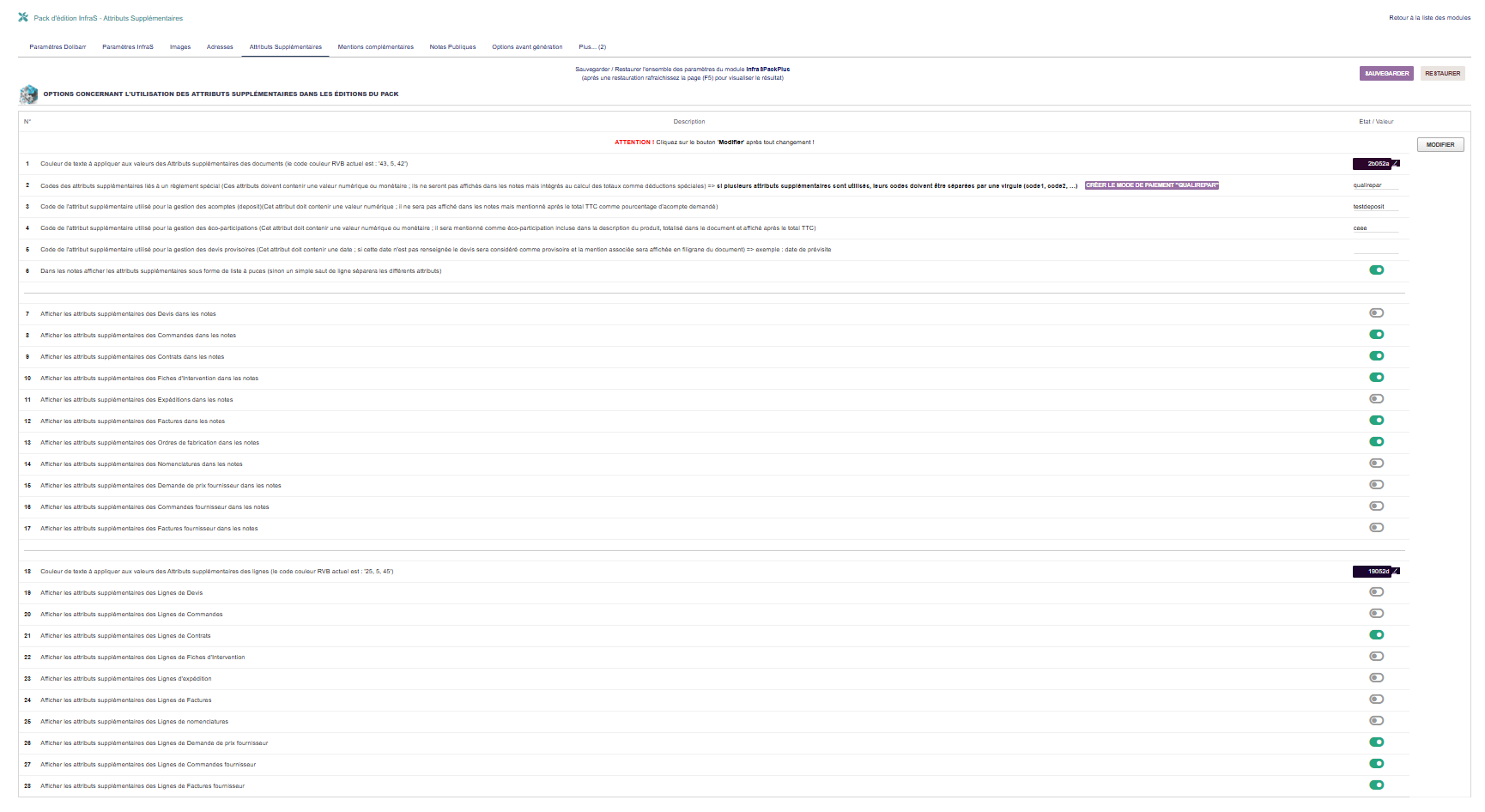](https://wiki.infras.fr/uploads/images/gallery/2026-02/scaled-1680-/fDBQOyqzq3v9WDLC-as.png)
#### **CONFIGURATION GÉNÉRALE**
| **Option**
| **Description**
|
|---|
| **\[1\]**
| **Couleur texte attributs documents**
Couleur appliquée aux valeurs (RVB, hexa, HSV)
|
#### **ATTRIBUTS SPÉCIAUX**
| **Option**
| **Description**
|
|---|
| **\[2\]**
| **Règlement spécial**
Attributs liés à un règlement spécial (valeur numérique/monétaire)
Non affichés dans notes mais intégrés aux totaux
|
| **\[3\]**
| **Gestion Acomptes (deposit)**
Valeur numérique, affichée comme pourcentage après TTC
|
| **\[4\]**
| **Gestion écotaxes**
Valeur numérique/monétaire, totalisée et affichée après TTC
|
| **\[5\]**
| **Devis provisoires**
Date, si non renseignée = devis provisoire avec mention en filigrane
|
| **\[6\]**
| **Liste à puces**
Afficher les attributs sous forme de liste à puces
|
#### **ATTRIBUTS DE DOCUMENTS**
**Afficher les attributs supplémentaires dans les notes :**
- - [ ] Devis **\[Ligne 7\]**
- [ ] Commandes **\[Ligne 8\]**
- [ ] Contrats**\[Ligne 9\]**
- [ ] Fiches intervention **\[Ligne 10\]**
- [ ] Expéditions **\[Ligne 11\]**
- [ ] Factures **\[Ligne 12\]**
- [ ] Ordres fabrication **\[Ligne 13\]**
- [ ] Nomenclatures **\[Ligne 14\]**
- [ ] Devis fournisseurs **\[Ligne 15\]**
- [ ] Commande fournisseur **\[Ligne 16\]**
- [ ] Facture fournisseur **\[Ligne 17\]**
#### **ATTRIBUTS DE LIGNES**
| **Option**
| **Description**
|
|---|
| **\[18\]**
| **Couleur texte attributs lignes**
Couleur appliquée aux valeurs (RVB, hexa, HSV)
|
**Afficher les attributs des lignes pour :**
- - [ ] Devis **\[Ligne 19\]**
- [ ] Commandes **\[Ligne 20\]**
- [ ] Contrats**\[Ligne 21\]**
- [ ] Fiches intervention **\[Ligne 22\]**
- [ ] Expéditions **\[Ligne 23\]**
- [ ] Factures **\[Ligne 24\]**
- [ ] Ordres fabrication **\[Ligne 25\]**
- [ ] Nomenclatures **\[Ligne 26\]**
- [ ] Devis fournisseurs **\[Ligne 27\]**
- [ ] Commande fournisseur **\[Ligne 28\]**
- [ ] Facture fournisseur **\[Ligne 29\]**
***Cas d'usage - Attributs spéciaux***
- **Règlement spécial** : Aides gouvernementales (ex: Prime énergie, Crédit d'impôt)
- **Acomptes** : Pourcentage d'acompte requis à la commande (ex: 30% à la commande)
- **Écotaxes** : DEEE, éco-participation (calculé et totalisé automatiquement)
- **Devis provisoire** : Date de visite technique (si vide, devis marqué "PROVISOIRE")
# 09. MENTIONS COMPLÉMENTAIRES
# Mentions complémentaires
**Accès :** Menu **InfraS → InfraSPackPlus → Mentions complémentaires**
[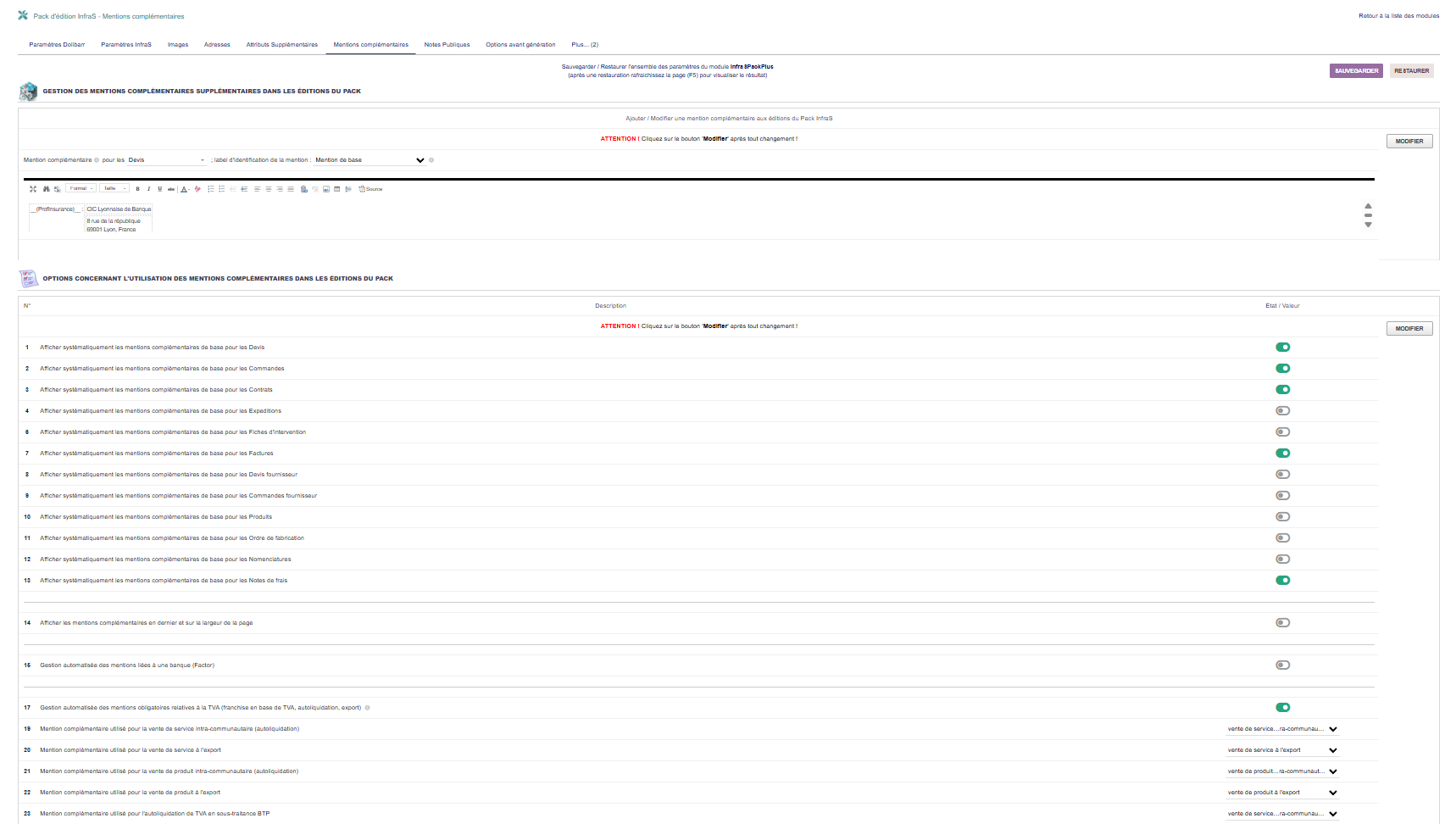](https://wiki.infras.fr/uploads/images/gallery/2026-02/scaled-1680-/nu3ugioElrPrCrvD-mc.png)
#### **1.PRÉSENTATION**
Les mentions complémentaires permettent d'ajouter des textes standardisés personnalisables sur vos documents (mentions légales, conditions particulières, clauses spécifiques, etc.).
***Fonctionnalités principales***
- Créer plusieurs types de mentions distincts par type de document
- Gérer toutes les mentions depuis une seule page
- Édition WYSIWYG complète (formatage riche)
- Support multi-langues via codes de traduction
- Intégration automatique ou sélective
**TYPES DE DOCUMENTS SUPPORTÉS**
- [x] Devis
- [x] Commandes
- [x] Contrats
- [x] Expéditions
- [x] Réceptions
- [x] Fiches intervention
- [x] Factures
- [x] Ordres fabrication
- [x] Nomenclatures
- [x] Demandes prix
- [x] Cmd fournisseur
- [x] Fiches produit
- [x] Notes de frais
#### **2.OPTIONS D'UTILISATION**
| **Option**
| **Description**
|
|---|
| **\[1-11\]**
| **Intégration automatique**
Intégrer systématiquement les mentions de base (par type de document)
|
| **\[12\]**
| **Position mentions**
Afficher en dernier et sur la largeur de la page
|
| **\[13-14\]**
| **Mention bancaire (Factor)**
Automatiser l'utilisation d'une mention liée à une banque
|
#### **3.MENTIONS OBLIGATOIRES TVA**
| **Option**
| **Description**
|
|---|
| **\[15\]**
| **Gestion automatique**
Gérer automatiquement les mentions TVA (franchise en base, autoliquidation, export)
|
| **\[16\]**
| **Micro-entreprise**
Mention pour franchise en base de TVA (Micro-entreprise)
|
| **\[17\]**
| **Autoliquidation**
Mention pour autoliquidation de la TVA
|
| **\[18\]**
| **Exonération**
Mention pour exonération de TVA
|
| **\[19\]**
| **Sous-traitance BTP**
Mention spécifique pour sous-traitance dans le BTP
|
| **\[20-21\]**
| **Mentions personnalisées**
Autres mentions selon régime TVA spécifique
|
#### **Exemples de mentions complémentaires**
***Mentions légales standard :***
- - TVA non applicable, art. 293 B du CGI (Micro-entreprise)
- Autoliquidation de la TVA par le preneur - Art. 283-2 du CGI
- Dispensé d'immatriculation au RCS - Art. L. 123-1-1 du Code de commerce
- Garantie décennale n° XXXXX - Assurance RC Pro n° YYYYY
***Clauses commerciales :***
- - Offre valable jusqu'au \[DATE\] sous réserve de disponibilité
- Pénalités de retard : 3 fois le taux d'intérêt légal
- Indemnité forfaitaire pour frais de recouvrement : 40 euros
- Escompte pour paiement anticipé : 2% à 30 jours
***Conditions particulières :***
- - Livraison franco de port pour commande supérieure à 500€
- Installation comprise dans un rayon de 50 km
- Garantie constructeur : 2 ans pièces et main d'œuvre
- Mise en service et formation incluses
####
# 10. NOTES PUBLIQUES
# Notes Publiques Standards
**Accès :** Menu **InfraS → InfraSPackPlus → Notes publiques**
[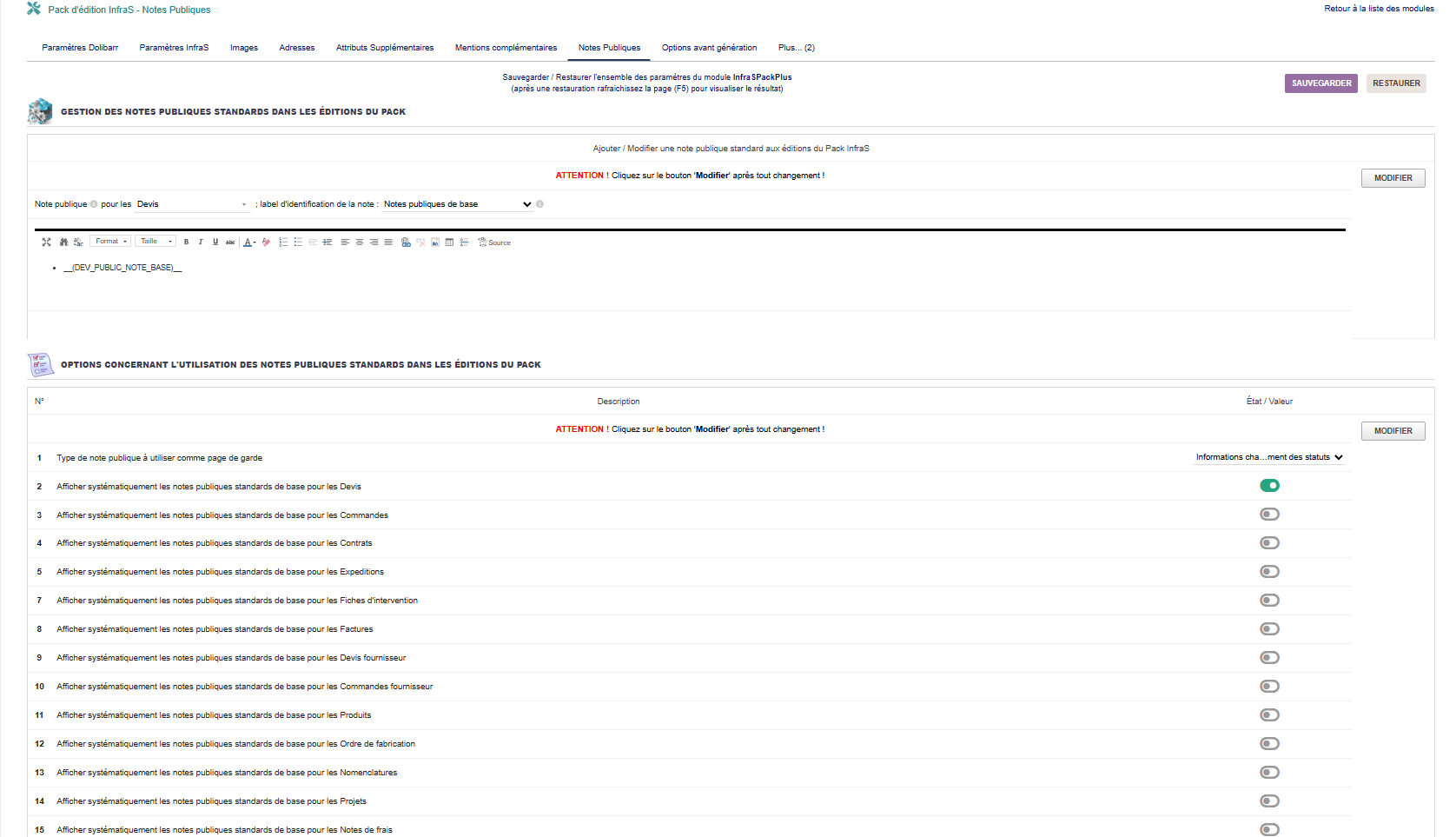](https://wiki.infras.fr/uploads/images/gallery/2026-02/scaled-1680-/C81pCTPfjJ88mvWJ-np.png)
#### **1.PRÉSENTATION**
Les notes publiques standards permettent de créer des textes prédéfinis réutilisables qui s'ajoutent aux notes publiques de vos documents. Idéal pour des informations récurrentes.
***Fonctionnalités principales***
- Créer plusieurs modèles de notes distincts par type de document
- Gérer toutes les notes depuis une seule page
- Édition WYSIWYG complète (formatage riche, images, tableaux)
- Support multi-langues via codes de traduction
- Possibilité de créer des pages de garde
#### **2.TYPES DE DOCUMENTS SUPPORTÉS**
- [x] Devis
- [x] Commandes
- [x] Contrats
- [x] Expéditions
- [x] Réceptions
- [x] Fiches intervention
- [x] Factures
- [x] Ordres fabrication
- [x] Nomenclatures
- [x] Demandes prix
- [x] Cmd fournisseur
- [x] Produits
- [x] Projets
- [x] Notes de frais
#### **3.OPTIONS D'UTILISATION**
| **Option**
| **Description**
|
|---|
| **\[1\]**
| **Page de garde**
Utiliser un type de note publique pour créer une page de garde dans les documents clients
|
| **\[2\]**
| **Devis**
Intégrer systématiquement les notes standards devis
|
| **\[3\]**
| **Commandes**
Intégrer les notes standards commandes
|
| **\[4\]**
| **Contrats**
Intégrer les notes standards contrats
|
| **\[5-13\]**
| **Autres documents**
Intégration pour : Expéditions, Réceptions, Fiches intervention, Factures, OF, Nomenclatures, Demandes prix, Cmd fournisseur, Notes de frais
|
**Exemples de notes publiques standards**
**Instructions de livraison :**
"Pour toute livraison, merci de contacter notre service logistique 48h à l'avance au 01.XX.XX.XX.XX.
Livraison en rez-de-chaussée uniquement. Pas de livraison le samedi.
Horaires de réception : 8h-12h et 14h-17h du lundi au vendredi."
**Consignes de sécurité :**
"Port des EPI obligatoire sur le site.
Présentation au poste de sécurité avant toute intervention.
Respect du plan de prévention fourni.
En cas d'urgence, composer le 18 ou le 112."
**Description des travaux :**
"Les travaux comprennent :
- - Dépôt de l'ancien matériel
- Installation du nouveau matériel
- Mise en service et réglages
- Formation de l'utilisateur
- Nettoyage du chantier"
#### **4.UTILISATION**
L'option \[1\] permet de créer une page de garde professionnelle :
- Présentation de votre entreprise
- Sommaire du document
- Visuels et branding
- Informations de contact détaillées
- Message personnalisé au client
**Astuce :** La page de garde est affichée avant l'en-tête standard du document, créant ainsi une première impression professionnelle.
#### **5.DIFFÉRENCE ENTRE NOTES PUBLIQUES ET MENTIONS COMPLÉMENTAIRES**
| **Notes Publiques**
| - Contenu descriptif long
- Informations pratiques
- Instructions détaillées
- Position : dans le corps du document
|
| **Mentions Complémentaires**
| - Textes légaux courts
- Clauses contractuelles
- Mentions obligatoires
- Position : en pied de document
|
# 11. OPTIONS AVANT GÉNÉRATION
# Options Avant Génération
**Accès :** Menu **InfraS → InfraSPackPlus → Options avant génération**
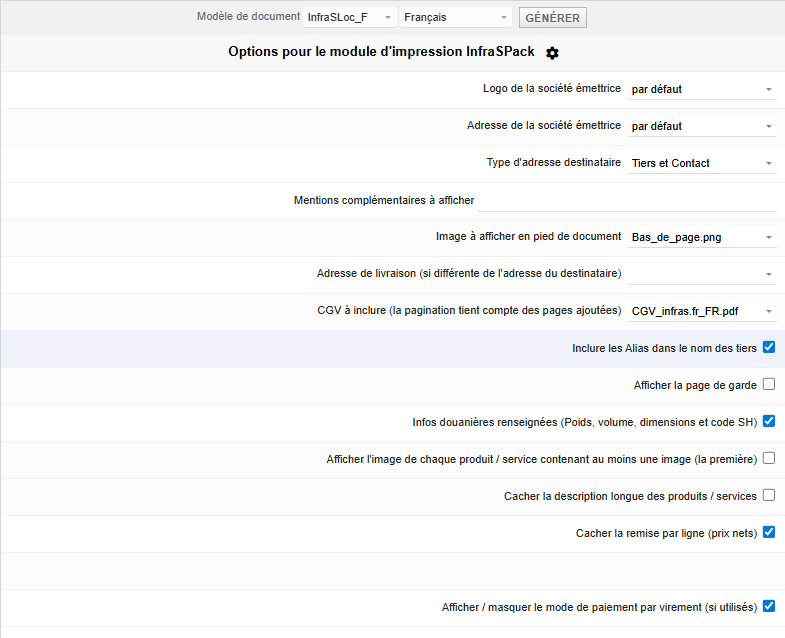
[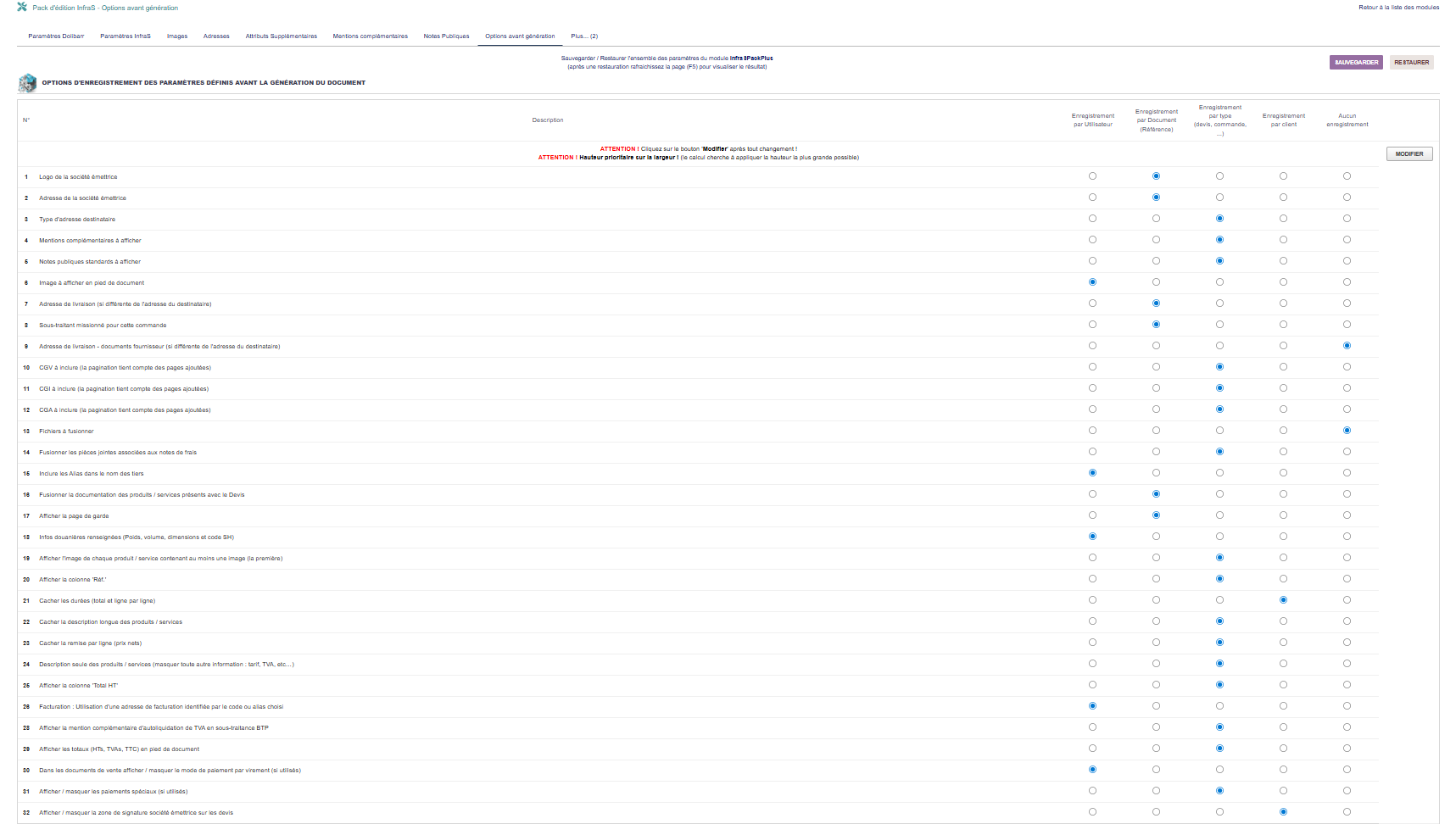](https://wiki.infras.fr/uploads/images/gallery/2026-02/scaled-1680-/9aawZNSyE8Wm4Byp-oag.png)
#### **1.PRÉSENTATION**
Cette section permet de configurer comment les options de génération sont enregistrées. Chaque option peut avoir son propre mode de mémorisation.
**Types d'enregistrement disponibles**
- **Par utilisateur** : Chaque utilisateur garde ses propres paramètres
- **Par document (référence)** : Mémorisé pour chaque document spécifique
- **Par type** : Mêmes paramètres pour tous les devis, factures, etc.
- **Par client** : Paramètres spécifiques pour chaque client
- **Non enregistré** : Nouveau choix à chaque génération
#### **2.OPTIONS CONFIGURABLES \[Ligne1 à 30\]**
| **N°**
| **Option**
| **Description**
|
|---|
| **1**
| **Choix du logo**
| Logo à utiliser pour ce document
|
| **2**
| **Adresse expéditeur**
| Quelle adresse société utiliser
|
| **3**
| **Image pied de page**
| Image à afficher en bas du document
|
| **4**
| **Adresse destinataire**
| Type d'affichage (tiers, contact, mixte)
|
| **5**
| **Mentions complémentaires**
| Quelles mentions inclure
|
| **6**
| **Notes publiques**
| Quelles notes standards inclure
|
| **7**
| **Adresse de livraison**
| Choix de l'adresse de livraison
|
| **8**
| **Sous-traitant**
| Contact externe comme sous-traitant
|
| **9**
| **CGV/CGA/CGI**
| Fichiers conditions générales
|
| **10**
| **Fichiers joints**
| Fichiers à fusionner
|
| **11**
| **Alias tiers**
| Inclure dans le nom
|
| **12**
| **Documentation produit**
| Fusion avec devis
|
| **13**
| **Page de garde**
| Afficher une page de garde
|
| **14-30**
| **Options diverses**
| Type adresse, infos douanières, images, colonnes, totaux, signatures, etc.
|
#### **3.ACCÈS AUX OPTIONS**
***Les options avant génération sont accessibles :***
1. Sur la fiche du document (avant génération PDF)
2. Via le bouton "Options" ou icône dédiée
3. Selon les droits de l'utilisateur
[](https://wiki.infras.fr/uploads/images/gallery/2026-02/scaled-1680-/pOnZ19mGbq1bAiiR-op.png)
***Stratégies d'enregistrement recommandées***
| **Logo / Images**
| **Par client** - Chaque client peut avoir son logo spécifique
|
| **CGV / Mentions**
| **Par type** - Même CGV pour tous les devis
|
| **Adresse livraison**
| **Par document** - Spécifique à chaque commande
|
| **Options affichage**
| **Par utilisateur** - Préférences personnelles
|
| **Signature client**
| **Non enregistré** - Nouvelle à chaque fois
|
***Cas d'usage pratiques***
- **Commercial itinérant**
Configuration : Options par utilisateur
→ Chaque commercial garde ses préférences d'affichage
→ Gain de temps, pas besoin de reconfigurer à chaque fois
- **Client avec plusieurs sites**
Configuration : Adresse livraison par document
→ Chaque commande garde son adresse de livraison
→ Facilite les rééditions et suivis
- **Activités multiples**
Configuration : CGV par client
→ CGV différentes selon le secteur d'activité du client
→ Automatisation de la conformité légale
# 12. TYPES DE DOCUMENTS DISPONIBLES
# Types de Documents
***InfraSPackPlus*** propose **plus de 37 modèles PDF** pour 20 types de documents différents.
#### **1.CHAÎNE DES VENTES**
| **Modèle**
| **Description**
|
|---|
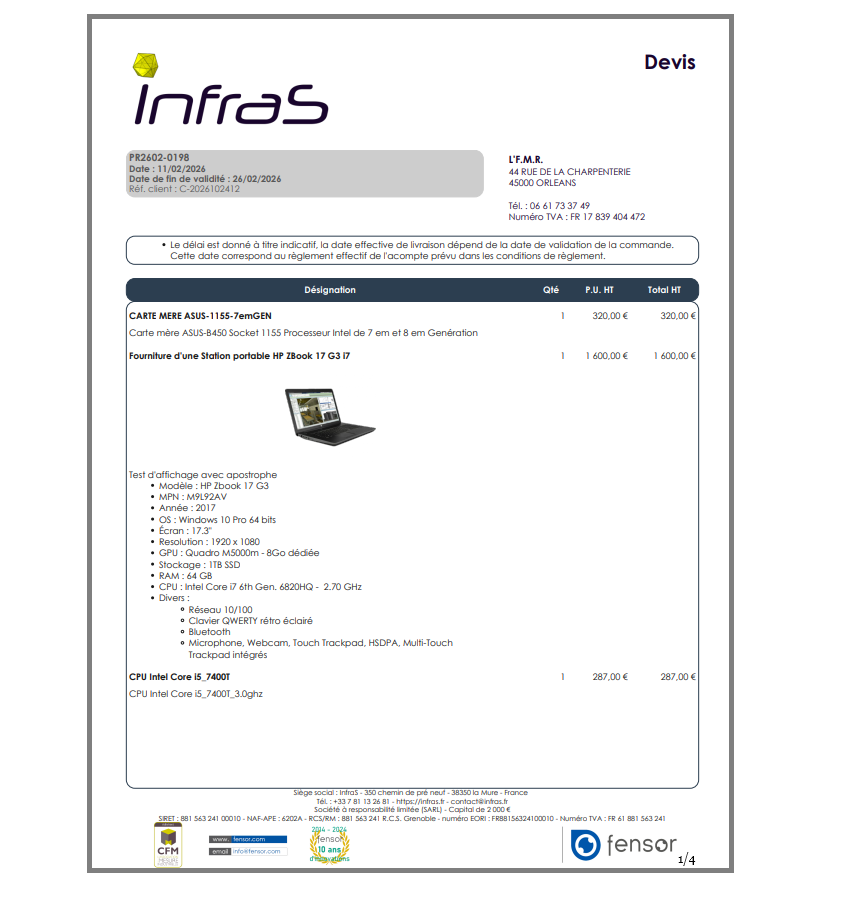
| **InfraSPlus\_DEV**
| Devis / Proposition commerciale
Compatible : Sous-Total, Milestone, Ouvrage/Forfait
|
| **InfraSPlus\_DST**
| Devis sans total (tarif / liste de prix)
Compatible : Sous-Total, Milestone, Ouvrage/Forfait
|
| **InfraSPlus\_CMD**
| Commande client
Compatible : Sous-Total, CustomLink, Milestone, Ouvrage/Forfait
|
| **InfraSPlus\_CMDB**
| Commande client avec code-barres
|
| **InfraSPlus\_PRO**
| Proforma
|
| **InfraSPlus\_CNT**
| Contrat
|
| **InfraSPlus\_FAC**
| Facture client
Compatible : Sous-Total, Équipement, Milestone, Ouvrage/Forfait
|
| **InfraSPlus\_BL**
| Bon de livraison / Expédition
Compatible : Équipement
|
| **InfraSPlus\_BR**
| Bon de livraison / Expédition (version réception)
|
| **InfraSPlus\_FIC**
| Fiche d'intervention
Compatible : Équipement
|
**Exemple :**
[](https://wiki.infras.fr/uploads/images/gallery/2026-02/scaled-1680-/EVxc0qviUtmpOwPE-doc1.png)
#### **2.CHAÎNE DES ACHATS**
| **Modèle**
| **Description**
|
|---|
| **InfraSPlus\_SDEV**
| Devis fournisseur (Supplier proposal)
|
| **InfraSPlus\_SCMD**
| Commande fournisseur (Supplier order)
|
| **InfraSPlus\_SFAC**
| Facture fournisseur (Supplier invoice)
|
| **InfraSPlus\_RE**
| Bon de réception
|
#### **3.DOCUMENTS TECHNIQUES**
| **Modèle**
| **Description**
|
|---|
| **InfraSPlus\_PRD**
| Fiche produit / service
Documentation technique complète
|
| **InfraSPlus\_ETI**
| Étiquettes produits avec code-barre
Page d'étiquettes avec libellé et tarif
|
| **InfraSPlus\_ST**
| Fiche de stock
Mouvements et valorisation
|
| **InfraSPlus\_MRP**
| Ordre de fabrication (Manufacturing order)
Avec tableau de contrôle qualité
|
| **InfraSPlus\_BOM**
| Nomenclature (Bill of materials)
Liste des composants
|
#### **4.DOCUMENTS ADMINISTRATIFS**
| **Modèle**
| **Description**
|
|---|
| **InfraSPlus\_EXP**
| Note de frais (Expense report)
Compatible : Note de Frais Plus (Mikael Carlavan)
|
| **InfraSPlus\_UST**
| Carte utilisateur
Badge professionnel avec photo
|
| **InfraSPlus\_PRJ**
| Projet
Fiche récapitulative de projet/affaire
|
| **InfraSPlus\_BC**
| Fiche de bordereau de remise de cheque
|
#### **5.MODULES COMPLÉMENTAIRES SUPPORTÉS**
***Modules de présentation***
- **Sous-Total** (ATM Consulting - version améliorée InfraS)
- **Milestone/Jalon** (iNodbox)
- **Ouvrage/Forfait** (Inovea)
***Modules techniques***
- **Équipement** (Patas-Monkey)
- **CustomLink** (Patas-Monkey)
- **Note de Frais Plus** (Mikael Carlavan)
***Modules administratifs***
- **Attestation de TVA** (Iouston)
- **Number Words** (Total en toutes lettres)
***Modules paiement***
- **Infras2Bridge** (InfraS)
- Stripe, Paypal (natifs Dolibarr)
# 13. FONCTIONNALITÉS AVANCÉES
# Fonctionnalités Avancées
#### **1.SIGNATURES ÉLECTRONIQUES**
***Types de signatures disponibles***
- **Signature PAD** : Recueil en face à face avec tablette/souris (utilise jSignature)
- **Signature électronique** : Zones prévues dans le document
- **Cachet société** : Image de cachet/signature émetteur
| Document
| Client
| Société
| Tiers
|
|---|
| Devis
| **✓**
| **✓**
| -
|
| Commandes
| **✓**
| -
| -
|
| Contrats
| **✓**
| -
| -
|
| Bons de livraison
| **✓**
| -
| **✓**
|
| Fiches intervention
| **✓**
| **✓**
| -
|
| Ordres fabrication (OF)
| -
| -
| **✓**
|
***Codes QR supportés***
- **ZATCA** (Arabie Saoudite)
- **QR Suisse** (factures CH)
- **EPC** (BE, NL, DE, AT, FI)
- **Paiement en ligne** (Stripe, Paypal)
- **Virement Bridge** (Infras2Bridge)
***Codes-barres***
- Étiquettes produits
- Documents commerciaux
- Bons de livraison
- Hauteur/largeur réglables
#### **2.FACTURES DE SITUATION**
***Fonctionnalités***
- - Support des factures d'avancement de travaux
- Deux modes de présentation des totaux
- Calcul par avancement total ou de situation
- Gestion des pourcentages par ligne
- Affichage des situations précédentes
ÉCOTAXES ET RÈGLEMENTS SPÉCIAUX
| Fonctionnalité
| Description
|
|---|
| **Écotaxes**
| Via attribut supplémentaire produit
Mention dans description, totalisation, affichage après TTC
Support chaîne ventes et achats
|
| **Règlements spéciaux**
| 2 types configurables
Aides gouvernementales, primes
Séparation du reste des paiements
Via attributs supplémentaires dédiés
|
#### **3.GESTION MULTI-DEVISES**
***Fonctionnalités***
- - Support complet des documents en devise étrangère
- Ligne de total TTC supplémentaire en monnaie locale
- Affichage du symbole monétaire configurable
- Informations monétaires positionnables
- Conversion automatique selon le taux du jour
#### **4.TOTAL EN TOUTES LETTRES**
**Nécessite le module "Number Words"**
Affiche la mention "Arrêté à" suivie du total TTC en toutes lettres :
**exemple** : "Arrêté à la somme de mille deux cent trente-quatre euros et cinquante-six centimes".
Idéal pour les documents officiels et la comptabilité.
#### **5.POLICES DE CARACTÈRES PERSONNALISÉES**
***Import de polices TrueType (TTF)***
- Import de fichiers .ttf personnalisés
- Test de rendu avec 84 caractères différents
- Support alphabets étendus (accentués, symboles)
- Gras, italique, gras italique automatiques
- Compatible avec 98% d'un clavier AZERTY
#### **6.PERSONNALISATION AVANCÉE**
***Fichiers PHP personnalisés***
- En-tête personnalisé
- Pied de page personnalisé
- Masques PDF
- Traitements PDF
***Couleurs avancées***
- Sélection RVB, hexa, HSV
- Gestion de l'opacité
- Contraste auto noir/blanc
- Couleurs par élément
#### **7.BONNES PRATIQUES**
- **Signatures PAD** : Vérifiez la compatibilité de votre matériel (tablette, écran tactile)
- **Codes QR** : Testez la lisibilité avec plusieurs lecteurs
- **Polices personnalisées** : Utilisez le test de rendu avant déploiement
- **Couleurs** : Vérifiez le rendu à l'impression (pas seulement à l'écran)
- **Fichiers PHP** : Documentez vos personnalisations pour maintenance
# 14. SUPPORT ET DOCUMENTATION
# Support et Documentation
#### **CHANGELOG** ***:***
Accessible depuis : **Menu InfraS > InfraSPackPlus > Changelog**
Contient toutes les évolutions et corrections de versions
#### **CONTACT SUPPORT**
✉ **Email :**
🌐**Site Web :** [www.infras.fr](https://www.infras.fr)
#### **DÉPENDANCES ET COMPATIBILITÉ**
***Module requis***
- - **ECM** (Gestion Électronique des Documents) - Module natif ***Dolibarr***
***Modules optionnels***
- - **Number Words** - Pour total en toutes lettres
- **Sous-Total** (ATM Consulting)
- **Milestone/Jalon** (iNodbox)
- **Ouvrage/Forfait** (Inovea)
- **Équipement** (Patas-Monkey)
- **CustomLink** (Patas-Monkey)
- **Attestation de TVA** (Iouston)
- **Infras2Bridge** (InfraS)
#### **BONNES PRATIQUES**
1. Toujours désactiver/réactiver après une mise à jour - Essentiel pour appliquer les modifications
2. Sauvegarder régulièrement vos paramètres - Avant modifications importantes
3. Tester sur documents test - Avant déploiement en production
4. Utiliser les options du module par défaut au départ puis activer progressivement les fonctionnalités
5. Documenter vos configurations - Facilite la maintenance
6. Consulter le wiki pour les cas spécifiques - Exemples et tutoriels détaillés
#### **LIMITATIONS CONNUES**
- - Les logos haute résolution augmentent la taille des PDF
- La génération automatique peut être lente sur du matériel ancien
- Certaines polices peuvent ne pas supporter tous les caractères
- Les filigranes d'images nécessitent plus de ressources
- Les multi-modèles augmentent le temps de traitement
#### **DÉPANNAGE RAPIDE**
| **Problème**
| **Solution**
|
|---|
| Module ne s'active pas
| Vérifier que le module ECM est activé
|
| Modifications non prises en compte
| Désactiver puis réactiver le module
|
| PDF non généré
| Vérifier les droits d'écriture dans documents/
|
| Polices manquantes
| Réactiver le module pour copier les polices
|
| Images non affichées
| Vérifier le chemin et les permissions des images
|
| Erreur extension PHP XML
| Installer l'extension php-xml
|